Workflow Action: Eliza AI Appointment Booking
Workflow Action: Eliza AI Appointment Booking
If is enabled with this feature, you can use the conversational tool within your workflows to automate booking appointments for your customers. The AI Booking Bot is built on top of Google’s Dialog Flow technology, allowing for powerful, automated booking conversations for your customers. Follow these steps to set up the AI Appointment Booking Bot for your Workflows, allowing you to automate your appointment booking process:
How to add this trigger to a workflow?
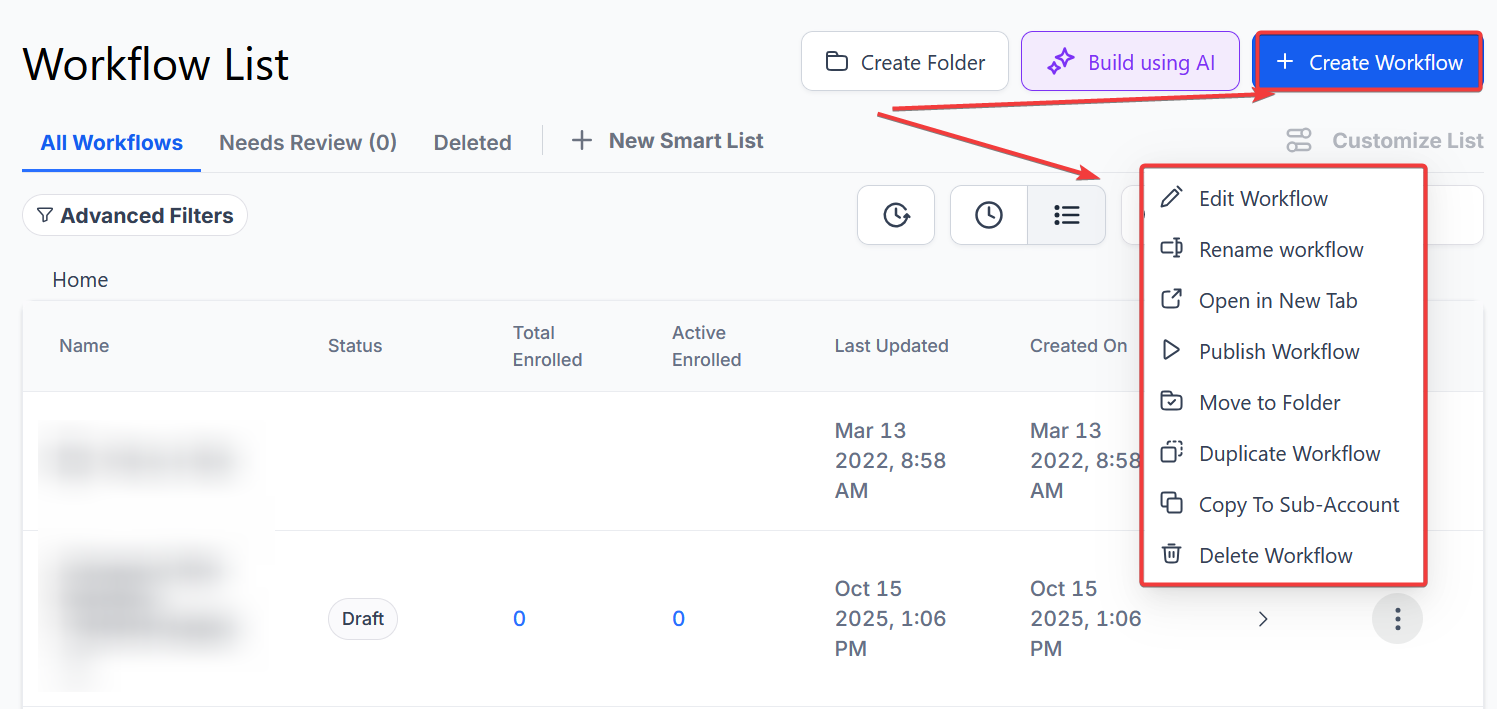
Step 1: Create a Workflow (or edit an existing one)
Section titled “Step 1: Create a Workflow (or edit an existing one)”- Navigate to Automation on the left > Workflows on the top and create a new workflow or edit an existing one
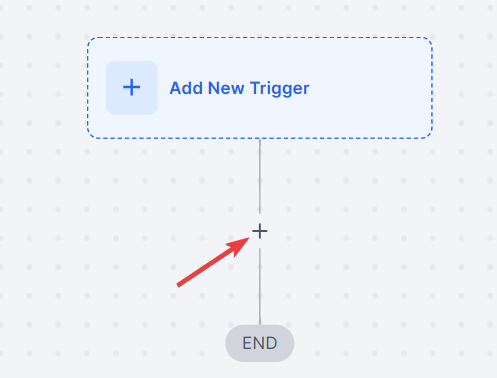
Step 2: Add the AI Appointment Booking Bot action
Section titled “Step 2: Add the AI Appointment Booking Bot action”Step 3: Customize the action configuration
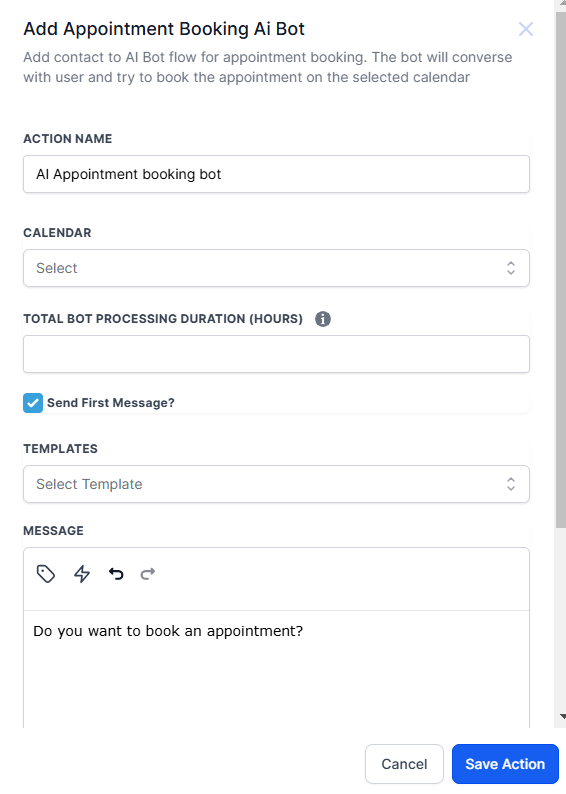
Section titled “Step 3: Customize the action configuration”- Choose the calendar you want the appointment to be booked for:
- Choose the amount of time you want the bot to “pay attention” to the Processing Duration
- Choose the initial message you want to send and check the box for “Send First Message” (unless you’ve done this in another way)
- Save the action to confirm your changes.
Step 4: Customize the rest of the Workflow.
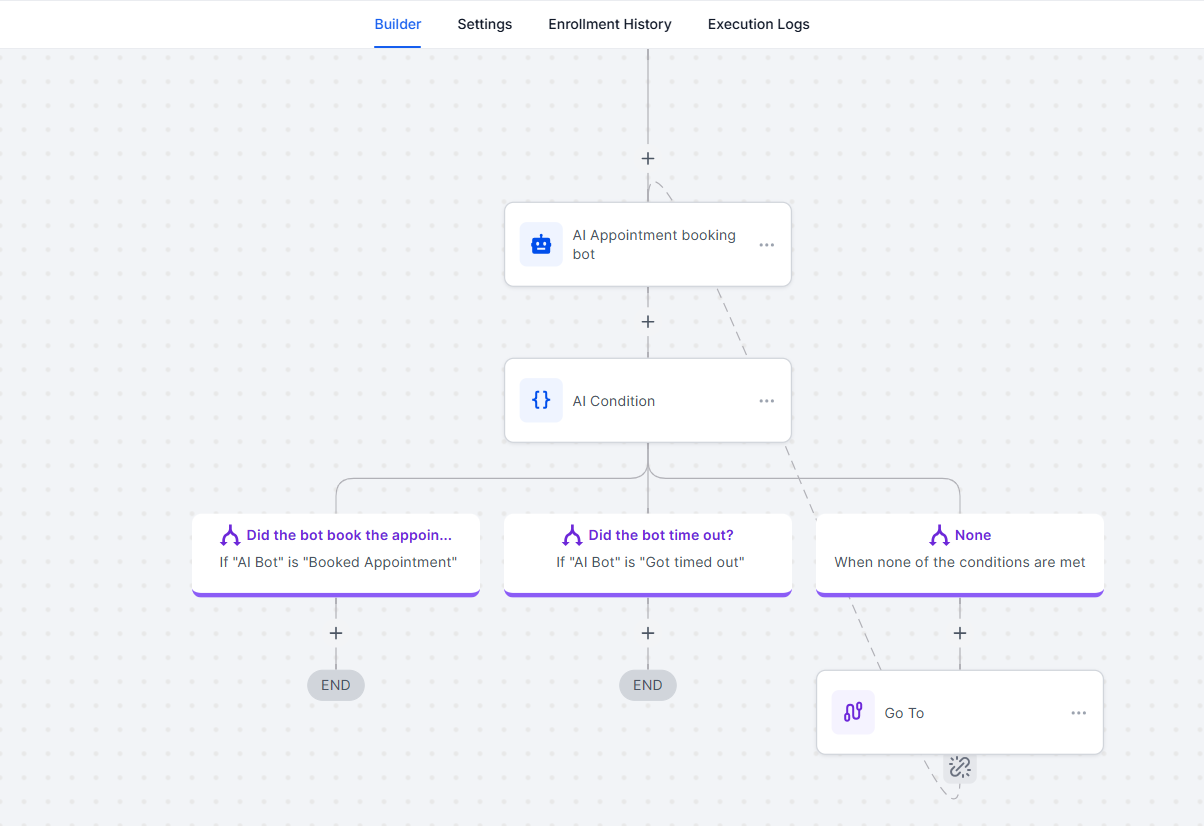
Section titled “Step 4: Customize the rest of the Workflow.”- If the bot is successful in booking the appointment, the contact will go down the left “Did the Bot Book The Appointment” If the bot times out, it will go down the “Did the Bot Time Out?” path.
- (You can further customize the paths as you wish.)
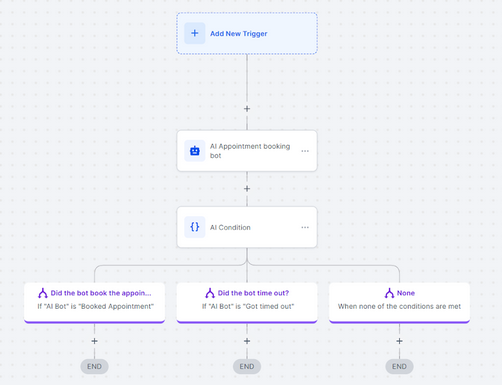
Step 5: If the bot did not book the appointment, the next path option will be “Yes” or “No” for Did the bot time out?
Section titled “Step 5: If the bot did not book the appointment, the next path option will be “Yes” or “No” for Did the bot time out?”- If the bot timed out, you will want to add in a human rollover option (for the “Yes” option).
- (You can continue to further customize the paths as you wish and include all paths for your unique situation.)
- Save the Workflow to confirm your changes.
Step 6: Test the Workflow and AI Bot
Section titled “Step 6: Test the Workflow and AI Bot”- We recommend testing the AI Bot Workflow yourself, with a test contact record, so you can best understand how it works and see how your contacts will experience it.
- Create a test contact record for yourself, and run through the Workflow.
NOTES: The AI Appointment Booking Bot has a DND feature where the user will be allowed to select DND for all sources or any specific source for a lead.
Question: What is the AI Appointment Booking Bot? Answer: The AI Appointment Booking Bot automates appointment scheduling using Google’s Dialog Flow technology, facilitating booking conversations with customers.
Question: How do I customize the initial message sent by the AI Bot? Answer: Enter your preferred initial message in the configuration settings for the AI Appointment Booking Bot and ensure the “Send First Message” box is checked.
Question: What should I do if the bot times out? Answer: If the bot times out, you can direct the contact to a human rollover option for follow-up. This ensures that leads are handled even if the bot fails to book the appointment.
Question: Can I test the AI Appointment Booking Bot before going live? Answer: Yes, testing is recommended. Create a test contact record and run through the workflow to see how the AI Bot functions and how it interacts with contacts.
Question: What is the DND feature in the AI Appointment Booking Bot? Answer: The DND feature allows users to select Do Not Disturb for all sources or specific sources, controlling when they receive appointment booking interactions.
Question: How do I handle different paths in the workflow? Answer: Customize the workflow paths based on whether the bot successfully books the appointment or times out. Add appropriate actions and options to manage both scenarios effectively.
Question: Can I use this bot for multiple calendars? Answer: Yes. You can select the calendar where appointments should be booked within the bot’s configuration settings.
Question: Can the bot handle different time zones?
Answer: Yes! The AI is smart enough to understand time zones. It will talk to the customer in their local time while ensuring the appointment is placed correctly on your calendar in your time zone.
Question: What technology powers the AI Appointment Booking Bot?
Answer: The AI Booking Bot is built on top of Google’s Dialogflow technology, which enables it to handle complex, automated booking conversations with your customers.
Question: Does the bot understand if a customer says “I’m busy then, what about Friday?” Answer: Yes. Because the bot is powered by Google’s Dialogflow, it understands “Natural Language.” It can interpret context, suggest alternative times based on your calendar’s real-time availability, and handle basic rescheduling requests within the chat.