WhatsApp Media Retention & “Add to Documents”
WhatsApp Media Retention & “Add to Documents”
This article serves as a comprehensive guide to understanding the enhanced media storage and management capabilities within . It outlines how your business can ensure long-term access to critical files shared via WhatsApp, moving beyond standard platform limitations to maintain a complete and reliable customer history.
Key Features and Benefits
The integration of advanced media retention ensures that your communication history remains intact, professional, and accessible. By addressing the standard expiration windows of third-party messaging, provides a more robust environment for client interactions.
- Extended Media Life: Both inbound and outbound media are automatically retained for one full year, bypassing the typical 7-day or 30-day expiration cycles.
- Centralized Documentation: The ability to save attachments directly to a contact’s profile ensures that all vital files—regardless of the original channel—are stored in one unified location.
- Automatic Archiving: Inbound and outbound files are captured by default, requiring no manual setup from the user.
- Cross-Channel Consistency: The workflow for managing WhatsApp media mirrors the familiar experience of handling Email and SMS attachments, reducing the learning curve for your team.
How to Manage Your WhatsApp Media
Section titled “How to Manage Your WhatsApp Media”Managing your files is straightforward and integrated directly into your existing conversation workflows.
1. Automatic Retention
Section titled “1. Automatic Retention”You do not need to take any action to benefit from the one-year storage. Whether a customer sends a photo (Inbound) or your team sends a proposal (Outbound), automatically secures these files to prevent them from becoming “expired” or “unavailable.”
2. Saving to Documents
Section titled “2. Saving to Documents”For files that are critical for long-term records (such as contracts or site photos), follow these steps:
- Navigate to the specific WhatsApp conversation.
- Locate the media attachment you wish to save.
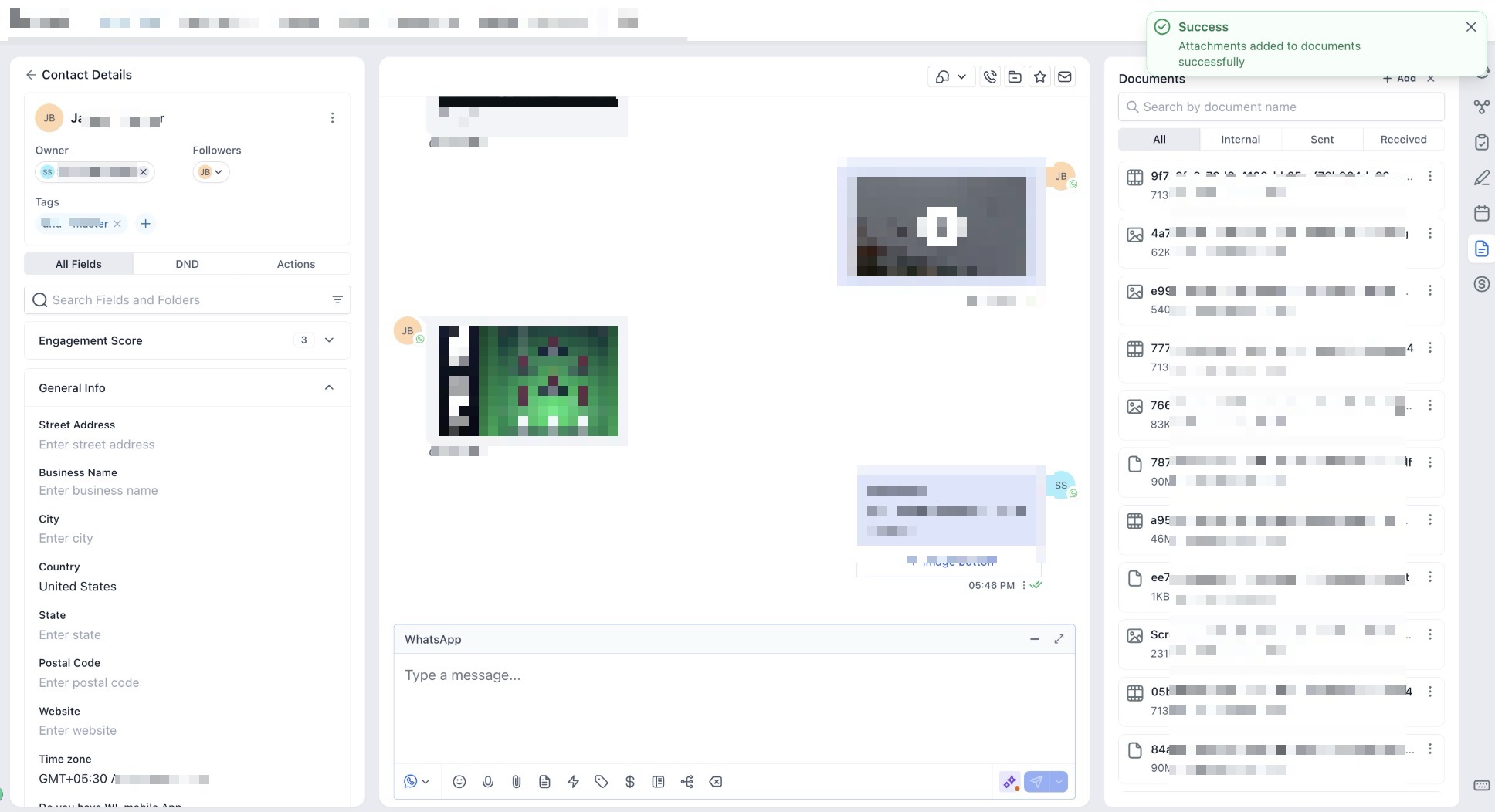
- Select the “Add to Documents” option.
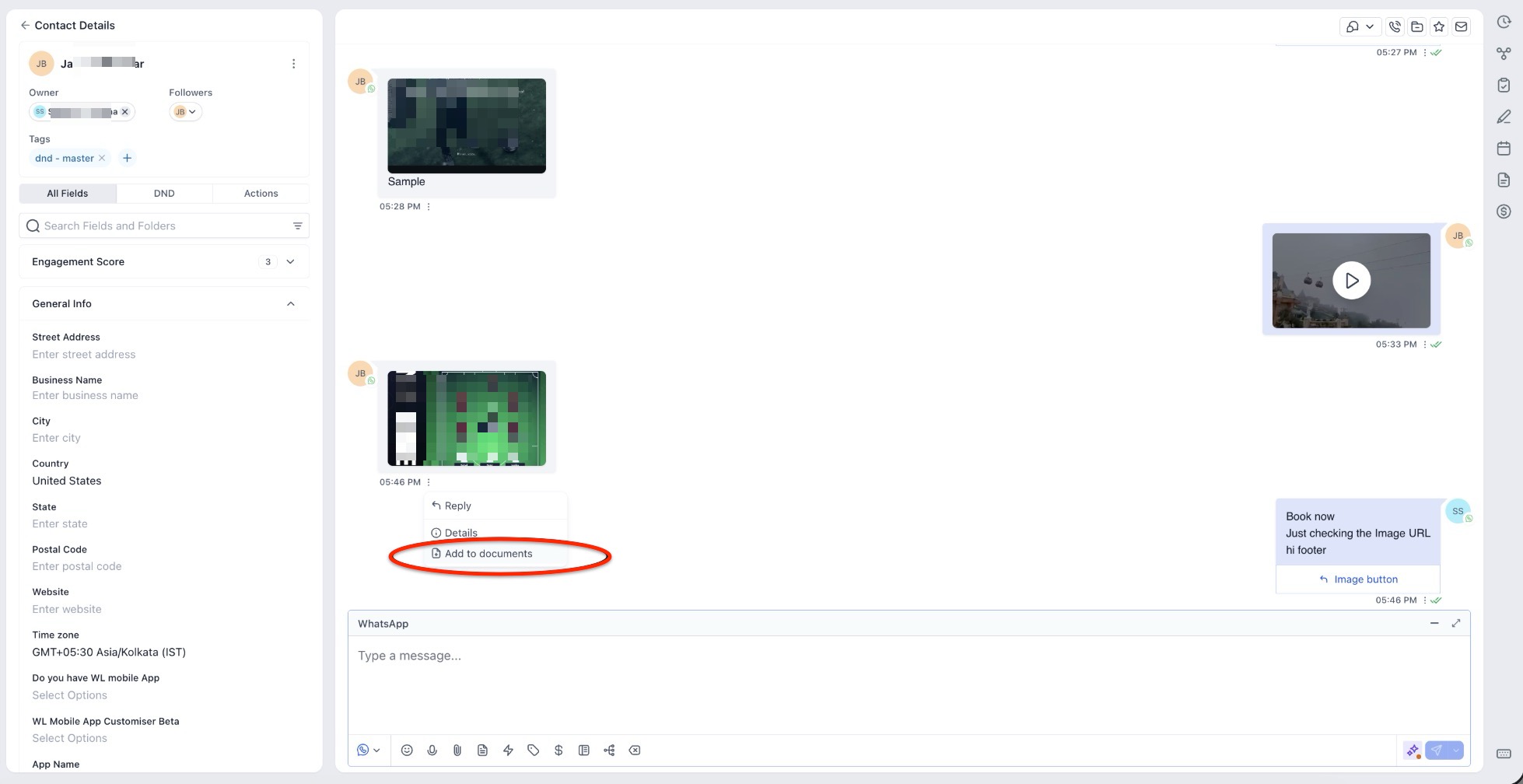
- The file will be instantly accessible within the contact’s Documents section for permanent record-keeping.
Use Cases
Section titled “Use Cases”- Service Providers: A contractor can save “before and after” site photos sent by a client directly to the project folder for future reference or audits.
- Professional Services: A sales representative can store a signed proposal sent via WhatsApp alongside the client’s email history to ensure a 360-degree view of the deal.
- Healthcare & Wellness: Clinics can retain patient-shared documents or forms without the risk of the file disappearing after the standard 7-day window.
Pro Tips for Media Management
Section titled “Pro Tips for Media Management”Pro Tip: Establish a “Document Standard” for your team. While__CompanyName stores all media for a year, encourage staff to use the “Add to Documents” feature specifically for files that are required for compliance, legal audits, or long-term project management. This keeps the Documents folder clean and reserved for only the most essential records.
FAQs
Question: How long does retain media shared via WhatsApp?
Answer: Both inbound and outbound media are automatically retained for one full year, bypassing the standard 7-day or 30-day expiration cycles common on other platforms.
Question: Do I need to manually set up a process to archive my incoming and outgoing files?
Answer: No. Automatic archiving is a key feature, meaning inbound and outbound files are captured by default without requiring any manual setup from the user.
Question: How can I save a specific WhatsApp attachment to a contact’s permanent records?
Answer: Navigate to the specific WhatsApp conversation, locate the media attachment, and select the “Add to Documents” option. This moves the file to the contact’s Documents section for permanent record-keeping.
Question: Is the process for managing WhatsApp media different from handling Email or SMS attachments?
Answer: No. The workflow for managing WhatsApp media is designed to mirror the familiar experience of handling Email and SMS attachments to ensure cross-channel consistency and a low learning curve.
Question: What is the recommended “Pro Tip” for keeping a contact’s Documents folder organized?
Answer: While all media is stored for a year, the “Pro Tip” is to establish a “Document Standard” where staff only use the “Add to Documents” feature for essential files required for compliance, legal audits, or long-term project management.
Question: Does this one-year retention apply only to photos my clients send to me?
Answer: No. The extended media life applies to both inbound and outbound media. This ensures that the proposals or documents your team sends are just as protected as the files your customers provide.
Question: Is there a limit on the file size for WhatsApp attachments being stored for a year? Answer: The system is designed to handle standard WhatsApp media types; however, consistent with standard document management, it is best practice to move critical files to the Documents section to ensure they are indexed for long-term project management.
Question: Can my team save “before and after” photos sent by clients?
Answer: Absolutely. Service providers can save client-sent media directly to a project folder using the “Add to Documents” tool, ensuring those files are available for future reference or audits long after the original message was sent.