Missed Call WhatsApp Back
The purpose of this article is to provide a comprehensive guide on implementing an automated messaging solution for missed calls. By transitioning from traditional follow ups to instant digital communication, businesses can significantly reduce lead churn and improve customer satisfaction. This article covers the core mechanics, benefits, and practical applications of using automated messaging to ensure no opportunity is overlooked.
Overview
Section titled “Overview”Missed calls often represent missed revenue. To bridge this gap, modern communication systems now offer a seamless way to automatically follow up with customers via instant messaging when a business is unable to answer the phone. Instead of relying on manual outreach or basic voice messages, businesses can immediately acknowledge a caller through a platform where users are highly active and responsive.
Key Features and Benefits
Section titled “Key Features and Benefits”- Immediate Engagement: Automatically triggers a message the moment a call is missed, ensuring the customer feels heard and valued.
- Zero Complexity: Designed to function without the need for intricate automation builders or complex logic.
- Customizable Content: While a standard template is often provided for immediate use, businesses can tailor the message to reflect their unique brand voice.
- Personalization Variables: Supports dynamic data such as business names, agent names, and scheduling links to make every interaction feel personal.
- System Synergy: Functions alongside existing automation, allowing for multi layered communication strategies without conflict.
- Higher Conversion Rates: Reaches customers on familiar messaging platforms, which typically see higher open and response rates compared to standard text messages.
How to Enable Automated Follow Ups
Section titled “How to Enable Automated Follow Ups”Setting up this feature is straightforward and requires minimal technical knowledge. Follow these steps to activate the service:
- Access Settings: Navigate to the main settings menu within your dashboard.
- Locate Phone Settings: Select the section labeled Phone System and then choose the Voice category.
- Open Follow Up Options: Locate the section for Missed Call Text Back.
- Enable Missed Call WhatsApp Back: Toggle the switch to activate the automated messaging feature.
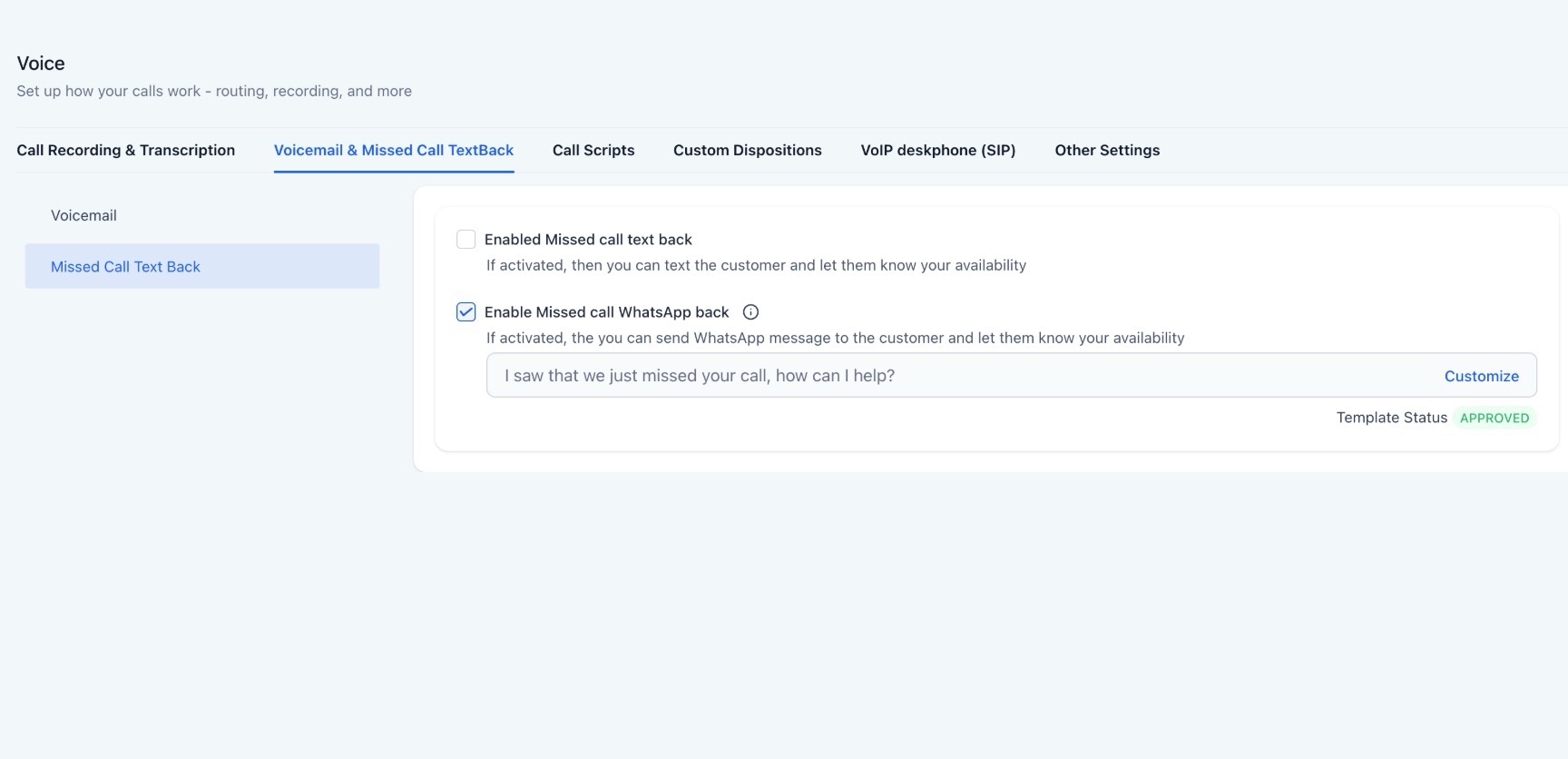
5. Customize (Optional): Review the default template. If desired, edit the text to include specific variables like your business hours or a booking link.
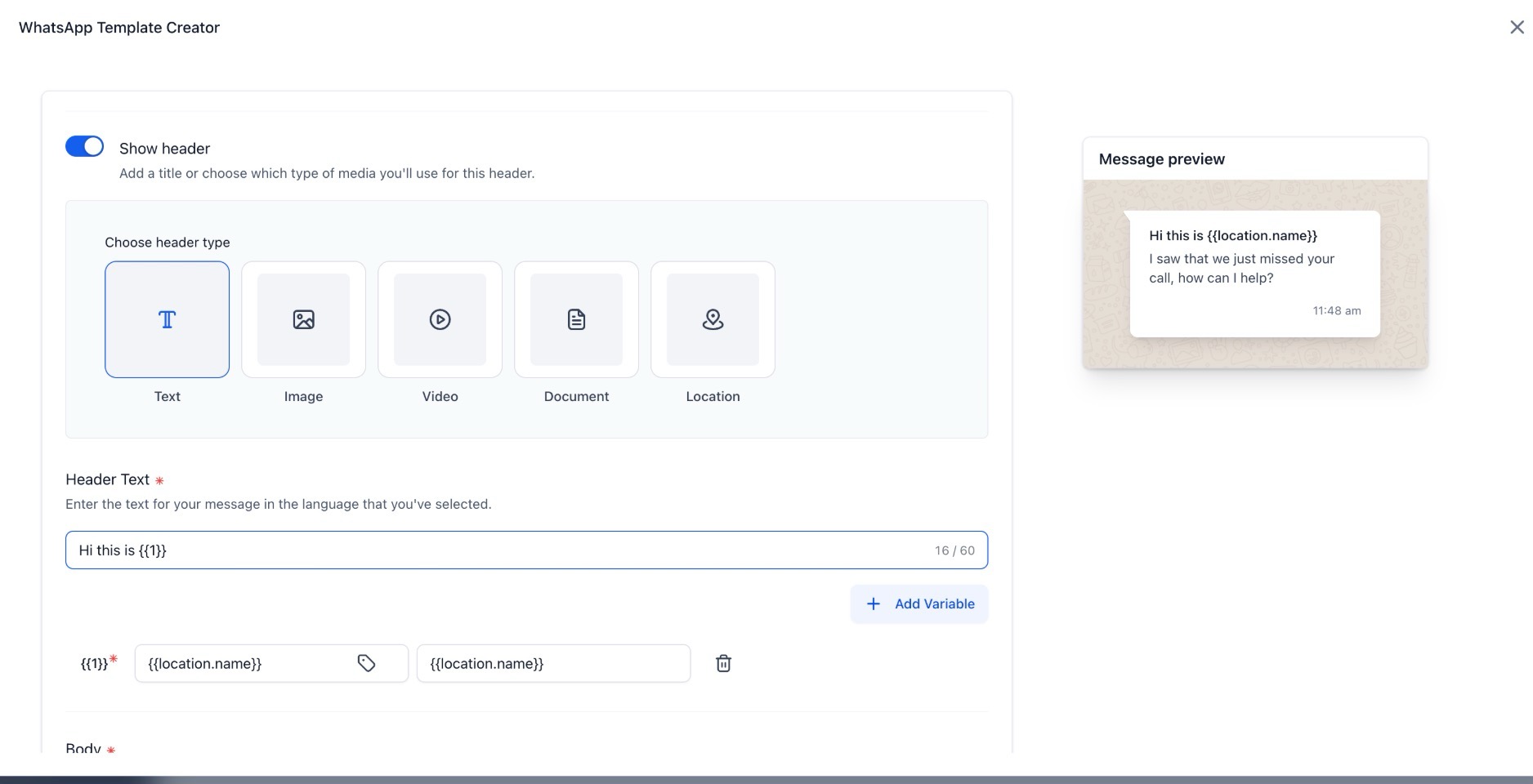
6. Save Changes: Confirm your settings to go live immediately.
Use Cases
Section titled “Use Cases”Healthcare and Wellness
Section titled “Healthcare and Wellness”A local clinic often misses calls during peak hours or lunch breaks. With automated messaging, patients receive a prompt asking if they would like to schedule an appointment via a link, preventing them from calling a competitor.
Real Estate
Section titled “Real Estate”Agents are frequently in meetings or showing properties. When a potential buyer calls and is not answered, they receive an instant message offering to schedule a viewing or providing additional property details, keeping the lead warm.
Professional Services
Section titled “Professional Services”Legal or consulting firms can use this to acknowledge after hours inquiries, providing the caller with standard operating hours or an intake form to fill out while they wait for a return call.
Pro Tips for Maximum Impact
Section titled “Pro Tips for Maximum Impact”- Include a Call to Action: Don’t just say “sorry we missed you.” Include a specific next step, such as “Click here to book” or “Reply with your question,” to keep the momentum going.
- Leverage Business Hours: Use personalization tags to mention your operating hours so callers know exactly when to expect a human response.
- Direct Modification: Remember that customization for this specific feature is handled within the phone settings menu, rather than a general message template library. This allows for quicker updates without navigating through multiple departments.
Question: How can a healthcare clinic use automated messaging to prevent losing patients to competitors?
Answer: When a clinic misses a call during peak hours or lunch breaks, they can send an automated prompt asking the patient if they would like to schedule an appointment via a link.
Question: What benefit does automated messaging provide to real estate agents who are busy showing properties?
Answer: It allows the agent to send an instant message to unanswered callers, offering to schedule a viewing or providing additional property details to keep the lead warm.
Question: How can professional service firms manage inquiries that come in after hours?
Answer: Firms can use automated messages to acknowledge the inquiry and provide the caller with standard operating hours or an intake form to fill out while they wait for a return call.
Question: What should be included in an automated message to ensure it has maximum impact?
Answer: You should include a specific Call to Action (CTA), such as a link to book an appointment or an invitation to reply with a question, rather than just apologizing for the missed call.
Question: Where are the customization settings for this specific automated messaging feature located?
Answer: Customization is handled directly within the phone settings menu rather than the general message template library, allowing for quicker updates.
Question: Is the “Missed Call Text Back” only for mobile numbers?
Answer: While the message is sent to the caller’s phone, the system identifies the inbound call from the Phone System settings. As long as the caller is using a device capable of receiving messages (like a mobile phone), they will receive the automated follow-up.
Question: Do I need to build a complex automation workflow to use this feature?
Answer: No. This feature is designed for Zero Complexity. It functions without the need for intricate automation builders or complex logic; you simply toggle it on in your settings.