In-App Subscription Cancellation for accounts
Managing billing should be simple, transparent, and in the hands of the right users. This helps streamline account management, minimize delays, and empower individual teams to manage their own subscriptions efficiently within the system.
Key Features and Benefits
Section titled “Key Features and Benefits”- In-App Cancellation AccessUsers can cancel subscriptions directly from their own billing section.
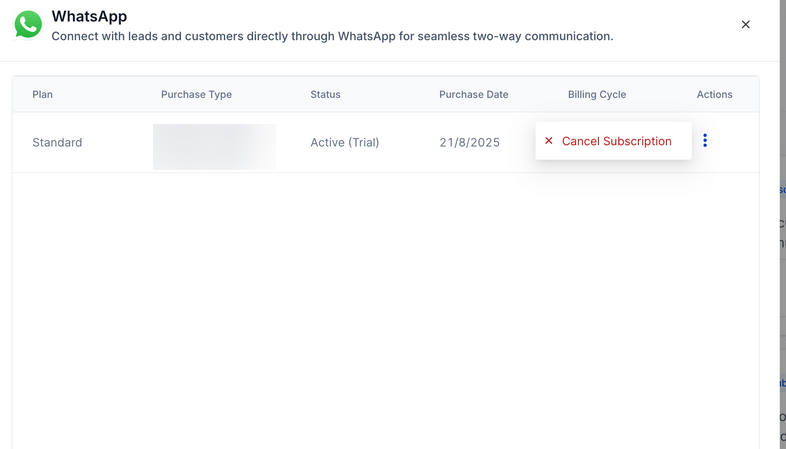
- Detailed Subscription OverviewUsers can view plan type, billing cycle, status, and purchase type in one place for better clarity.
- Unified Cancellation FlowA consistent unsubscribe process ensures that cancellation is clear, simple, and user-friendly across all product types.
How to Use In-App Subscription Cancellation
Section titled “How to Use In-App Subscription Cancellation”**Step 1:**Log in to your account and navigate to Settings → Billing → Subscriptions.
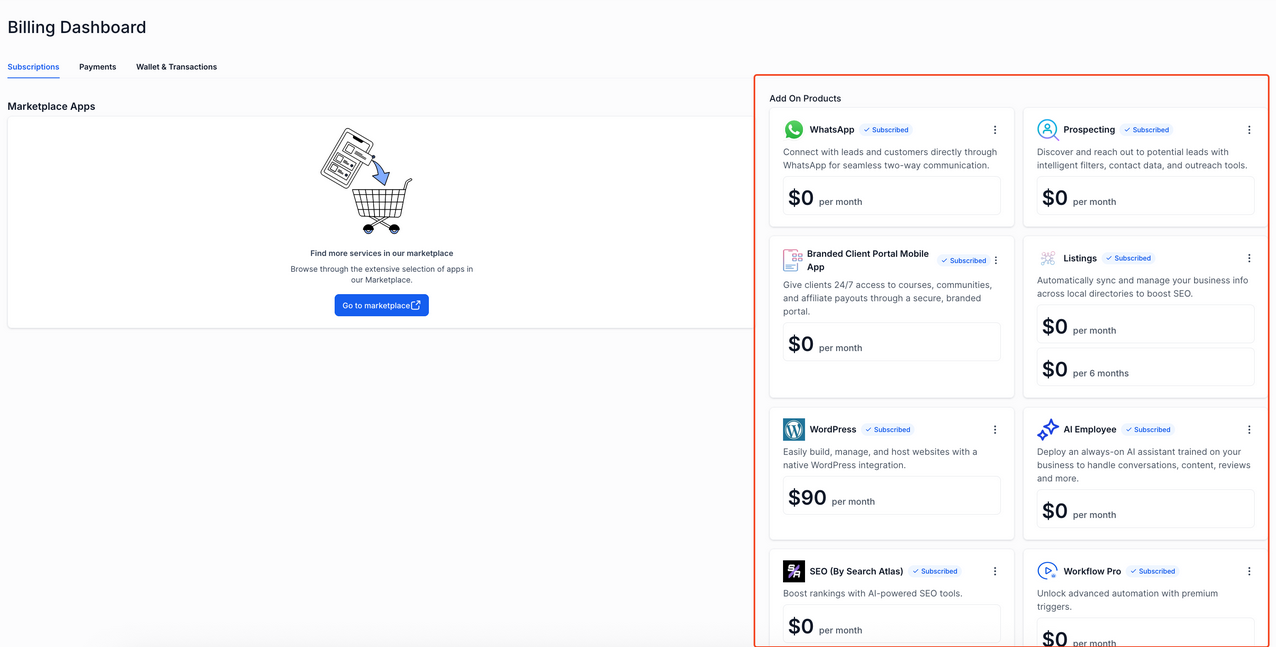
Locate the active subscription you want to review or cancel.
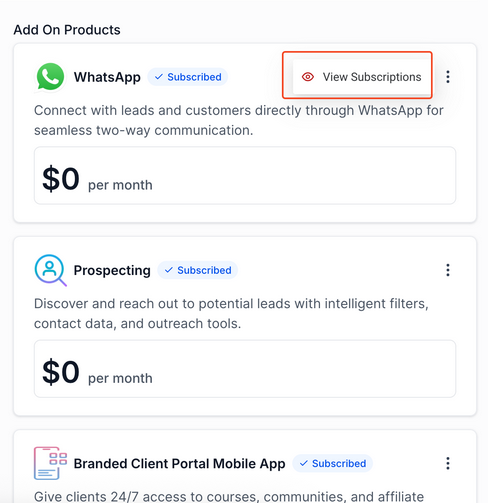
**Step 3:**Click the three-dot menu next to the subscription and select View Subscription.
**Step 4:**From the subscription detail view, click Cancel Subscription and follow the prompts to complete the process.
Pro Tips
Section titled “Pro Tips”- Review Before Cancelling: Always check the billing cycle and renewal date before cancelling to avoid unintended service interruptions.
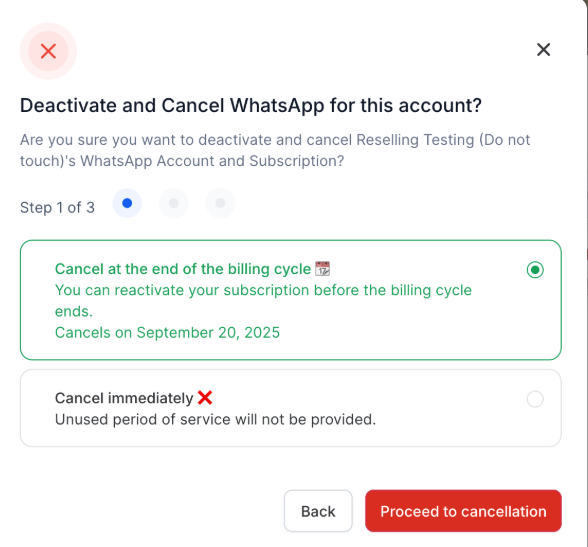
- Confirmation Required: A cancellation modal ensures users confirm their decision, helping prevent accidental cancellations.
- Retention Options: A retention message appears before final confirmation. Review carefully before proceeding.
Question: Will canceling a subscription end service immediately? Answer: Users can choose between cancelling the subscription at the end of their billing cycle or cancelling immediately. Any unused period of service will not be provided if users choose to cancel immediately.
Question: Is there a way to pause instead of canceling? Answer: Subscription pausing is not included in this flow. Users can cancel and resubscribe manually if needed later.
Question: What happens after cancellation? Answer: The service will remain active until the billing period ends, but if chosen to cancel immediately, the service will end abruptly. After that, access to the features included in the plan will be removed unless a new subscription is started.
Question: Are there retention messages or prompts before cancellation?
**Answer: Yes. A retention message may appear before final confirmation, giving you the opportunity to reconsider or review alternative options.
Question: Can I cancel my subscription directly in the app? Answer: Yes. Users have full in-app access to cancel their subscriptions without needing to contact support.
Question: If I cancel my subscription, will my stored data or previous records be deleted?
Answer: No. Cancelling a subscription simply removes access to the premium features of that specific module. Your existing data and history remain saved in , allowing you to access them again if you choose to resubscribe in the future.
Question: If I cancel my subscription, will my stored data or previous records be deleted?
Answer: No. Cancelling a subscription simply removes access to the premium features of that specific module. Your existing data and history remain saved in , allowing you to access them again if you choose to resubscribe in the future.
Question: Can individual team members manage their own billing, or does the account owner have to do it?
Answer: The system is designed to empower individual teams to manage their own subscriptions efficiently, helping to minimize delays and streamline overall account management.