Setting Up Buy Now Pay Later For Sales
Setting Up Buy Now Pay Later For Sales
Buy Now Pay Later (BNPL) is a payment option that allows customers to purchase items immediately and pay for them in installments. Popular BNPL providers include Affirm, Klarna, and Afterpay. Offering BNPL options can increase sales and improve customer satisfaction by providing flexible payment plans.
NOTE: The BNPL option only works in the online store with Stripe at the moment.
Step-by-Step Setup Guide
Section titled “Step-by-Step Setup Guide”1. Configuring Stripe Payment Methods:
Section titled “1. Configuring Stripe Payment Methods:”Go to Payments on the left > Integrations at the top > Stripe > Manage Payment Methods


- Enable the BNPL providers (Affirm, Klarna, Afterpay) you wish to offer

Note: If these payment methods are not activating, they are not available for your region/business yet. You can check the product support for the methods here
2. Setting Up Products in :
Section titled “2. Setting Up Products in :”- Go to Payments > Products and add/edit all the products you wish to include in your online store
- In the product configuration, toggle on the “Include in Online Store” setting, as the BNPL option only works with the online store at the moment

3. Set Up Your E-Commerce Online Store in :
Section titled “3. Set Up Your E-Commerce Online Store in :”Method 1:
- Go to sites > websites
- Create or edit a website and then open the page editor
- Add a new element using the “+” button and click on the “Store” category to create your online store
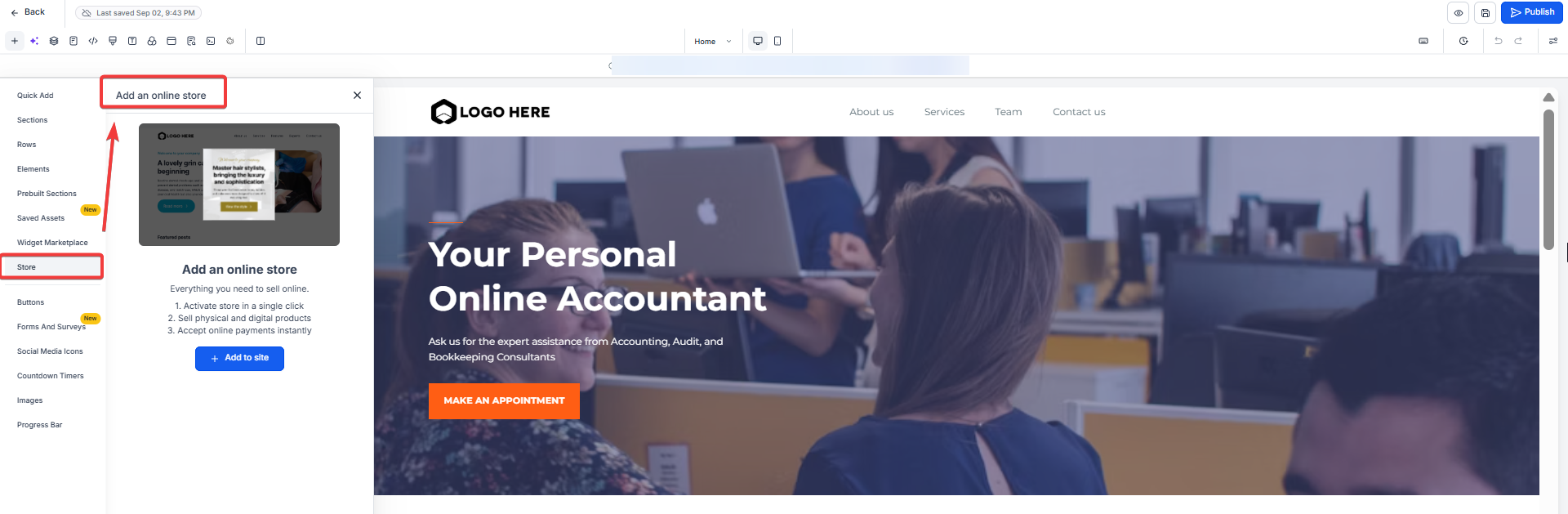
Method 2:
Alternatively, you can access the stores tab under sites to create your store from scratch or from available templates.

Eligibility and Requirements
Section titled “Eligibility and Requirements”Geographic Availability:
Section titled “Geographic Availability:”BNPL options are supported in specific countries. Ensure your business operates in one of these regions to offer these payment methods. You can check the list of countries by checking the documentation provided by Stripe
Transaction Limits:
Section titled “Transaction Limits:”Each BNPL provider has minimum and maximum transaction amounts. These limits vary by country, so it’s important to check the specific limits for your region
Provider
Transaction Limit
Affirm
USD 50 - 30,000
Afterpay
USD 1 - 4,000
Klarna
USD 10 - 5000 (varies by customer)
Business Categories:
Section titled “Business Categories:”Your business category must be correctly set in your payment processor (e.g., Stripe) to be eligible for BNPL options. Certain categories may have restrictions or be ineligible for specific BNPL providers.
Benefits of BNPL for Your Online Store
Section titled “Benefits of BNPL for Your Online Store”Increased Sales:
Section titled “Increased Sales:”Offering BNPL options can lead to higher conversion rates and larger order sizes. Customers are more likely to complete purchases when they have the flexibility to pay over time.
Customer Satisfaction:
Section titled “Customer Satisfaction:”BNPL enhances the shopping experience by giving customers more payment options. This flexibility can lead to increased customer loyalty and repeat business.
Question: Can I use BNPL for products not included in my online store?
Answer: No, BNPL is only available for products listed in the online store. Ensure the “Include in Online Store” toggle is enabled for relevant products.
Question: How do I troubleshoot if a BNPL option isn’t working? **Answer:
- Confirm that the provider is enabled in your account.
- Ensure your business meets transaction limits and category requirements.
Question: Can customers outside eligible regions access BNPL options?
Answer: No, BNPL is restricted to specific regions. Customers outside those regions won’t see these payment options.
Question: Do customers need a Stripe account to use BNPL?
Answer: No. Customers can use BNPL through the selected provider (Affirm, Klarna, Afterpay) without needing a Stripe account.
Question: Can BNPL be used for in-person payments? Answer: No. Currently, BNPL is only supported for online store purchases via Stripe.
Question: How do refunds work with BNPL? Answer: You can issue a refund through the CompanyName payments tab or your Stripe dashboard just like a regular transaction. The BNPL provider will then automatically adjust or cancel the customer’s remaining installments and refund what they have already paid.