Create and Configure a Branded Membership PWA
Create and Configure a Branded Membership PWA
With , we allow you to turn your Community Groups into a Progressive Web App. You can offer your courses and other features of the Community directly in the App. A Branded Membership Progressive Web App (PWA) is a web-based application that delivers an app-like experience directly through a browser. It lets you offer your users a pretty smooth, mobile-friendly membership experience without the hassle of going to the App Store or the Play Store. Unlike native mobile apps, PWAs can be installed directly on a user’s device from a website, providing accessibility, branding flexibility, and faster deployment. It can also save the cost and time of developing an App on the App Store or the Play Store
A branded setup means that the PWA can be fully customized to reflect a business’s own branding logos, colors, icons, and domain without any third-party branding. This helps organizations maintain a professional, cohesive presence across all digital touchpoints.
Key Features and Benefits
Section titled “Key Features and Benefits”1. Cross-Platform CompatibilityA PWA works effortlessly on desktops, tablets, and mobile devices, eliminating the need to create and maintain separate applications.
2. Offline AccessUsers can view previously loaded pages or content even without an internet connection, improving accessibility and user experience.
3. App-Like Feel Without App StoresPWAs offer a native app experience complete with icons, splash screens, and smooth navigation without requiring app store submissions or downloads.
4. Automatic UpdatesBecause PWAs run on the web, updates happen instantly. Users always access the latest version without having to install updates manually.
5. Brand Consistency
As the word “Branded” says it all, you can rebrand and fully customize the images and the domain of the app according to the suitability of your business.
6. SEO VisibilityUnlike traditional apps, PWAs are discoverable by search engines, making it easier to attract organic traffic and new members.
How to Set Up Your Branded Membership PWA
Section titled “How to Set Up Your Branded Membership PWA”Step 1: Access Membership SettingsNavigate to the Memberships section within the dashboard. Open Courses > Settings to access your membership configuration options.
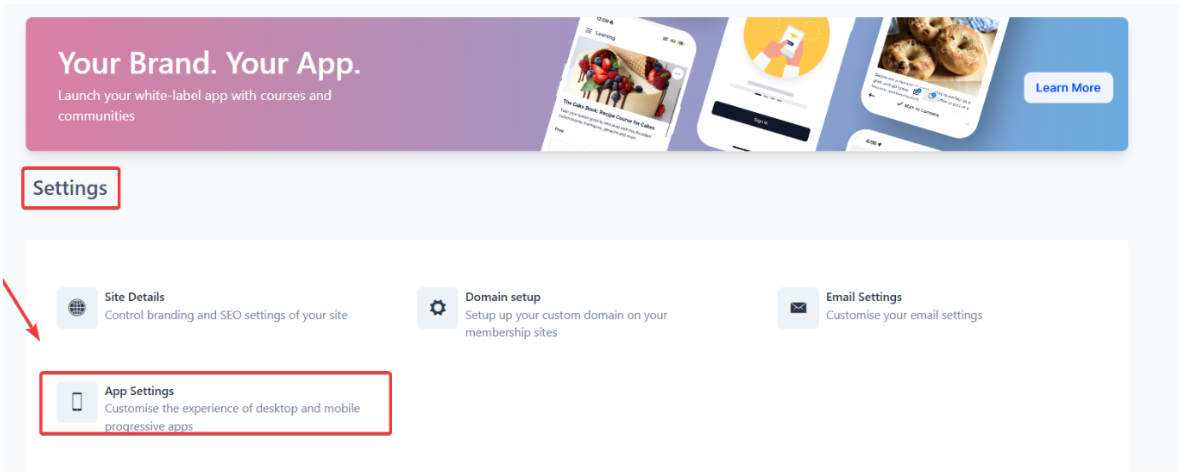
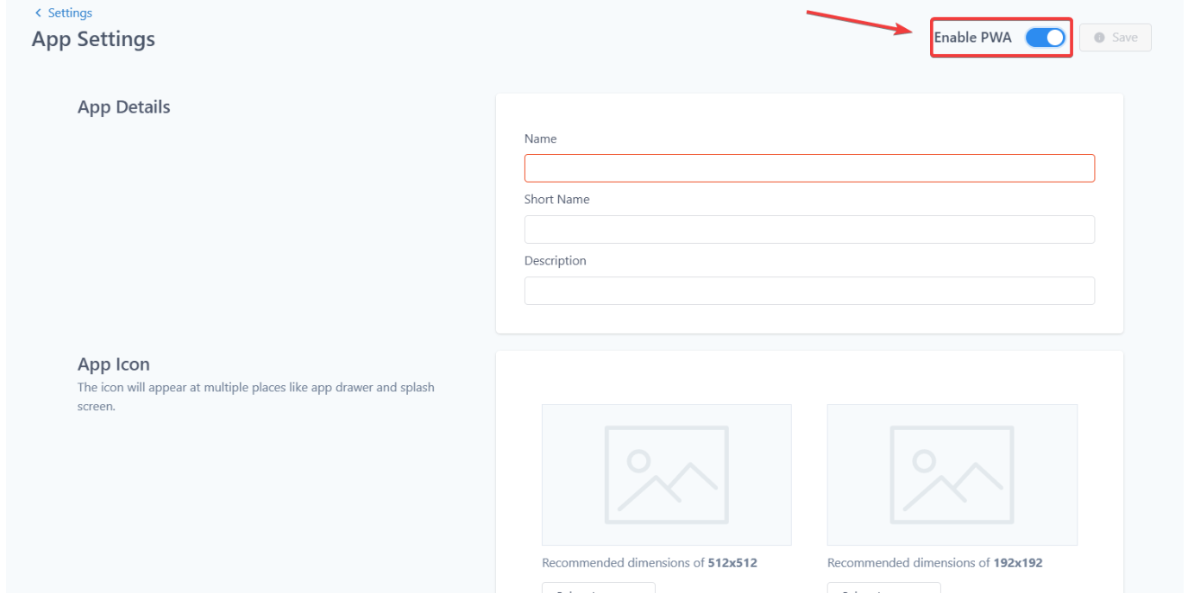
Step 2: Enable PWA InstallationWithin the settings area, locate the App Settings tile and toggle the Enable PWA option. This activates the functionality that allows users to install your membership site as an app on their device.
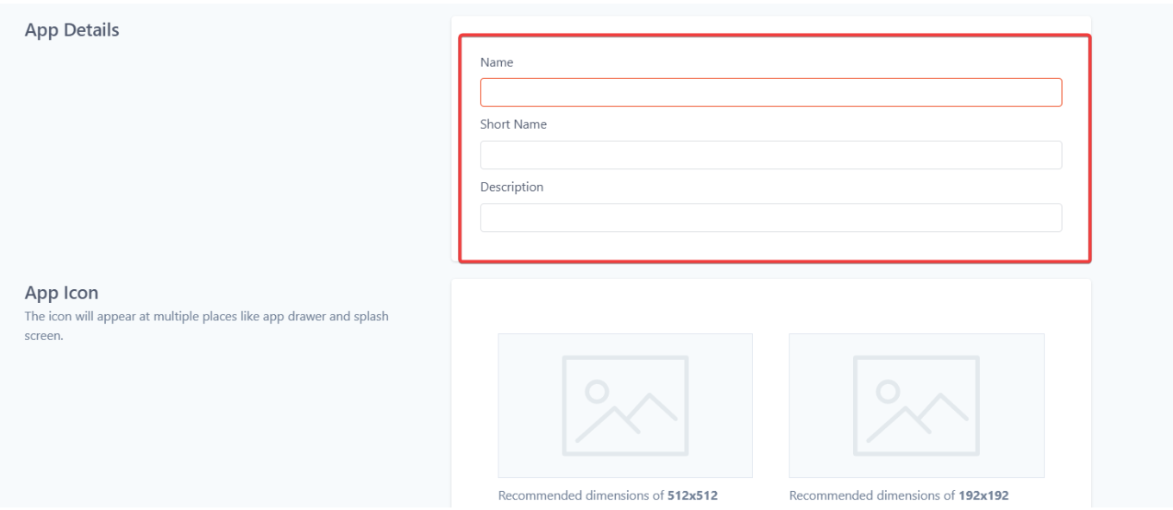
Step 3: Configure App DetailsFill in your App Name, Short Name, and Description. These will appear during installation prompts and on users’ home screens. Keep them clear and branded.
Step 4: Upload App IconsAdd both large (512x512) and small (192x192) icons in .png or .jpg format. These icons appear on device home screens, splash screens, and browsers.
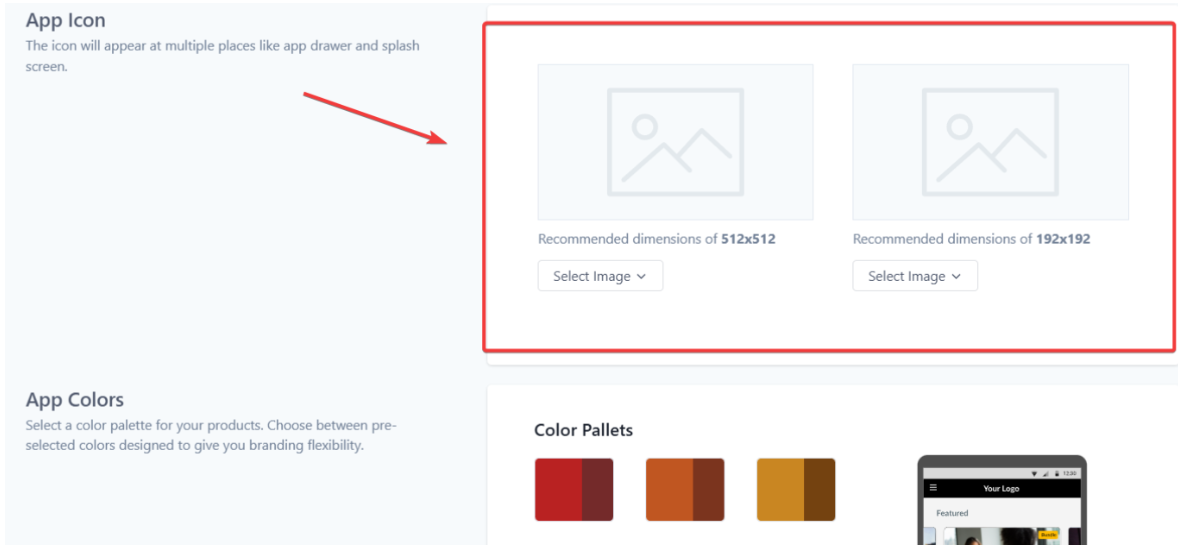
Step 5: Select Theme ColorsChoose a color palette that complements your brand identity. These colors will appear on buttons, headers, and other interface elements.
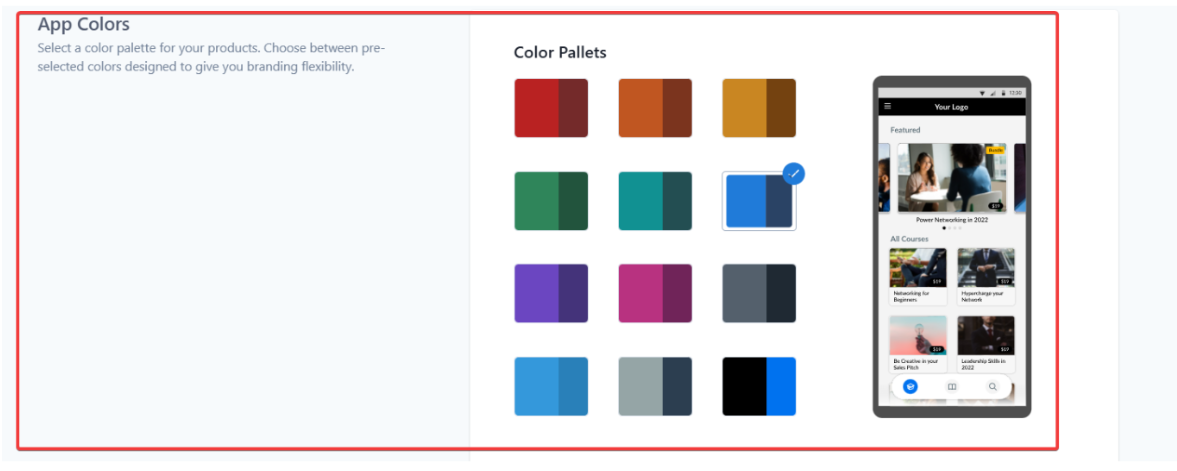
Step 6: Save Your SettingsOnce all information is entered, click Save to apply the configuration.
Installing the Membership PWA
Section titled “Installing the Membership PWA”**On a Windows Computer:**When users log into your membership portal using Chrome, they’ll see an install icon in the browser address bar. Clicking it installs the PWA as a desktop shortcut.
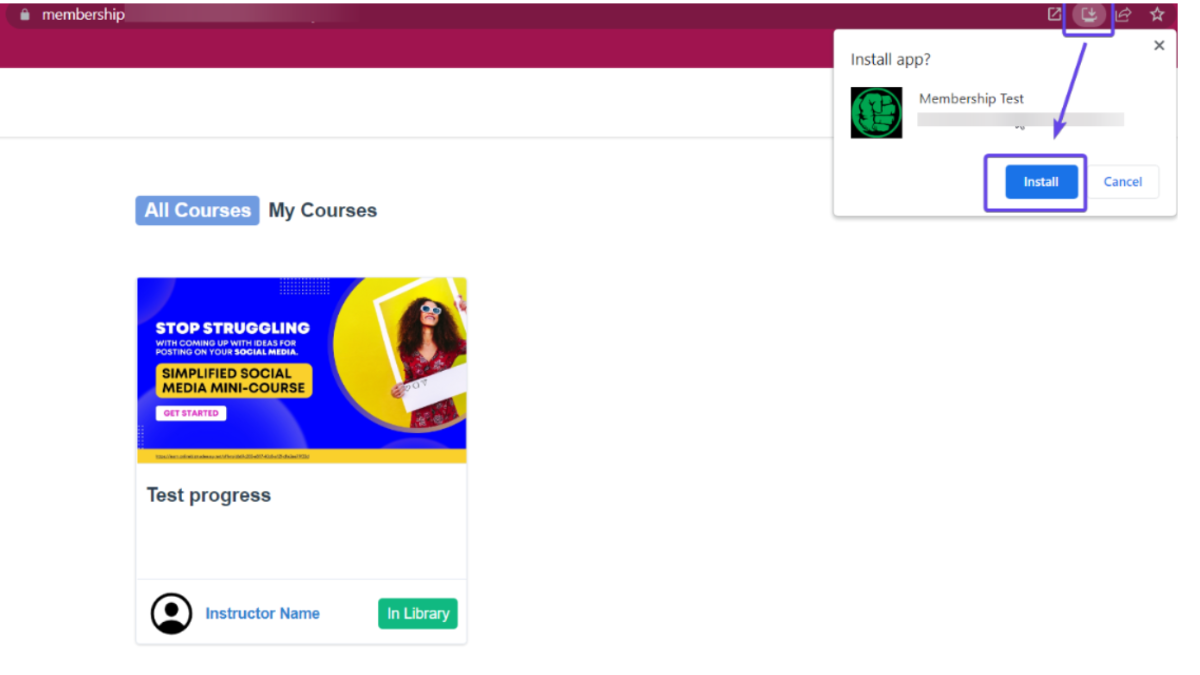
**On a Mac Computer:**Using Chrome, users can install the PWA directly from their membership login page by selecting the install option in the browser menu.
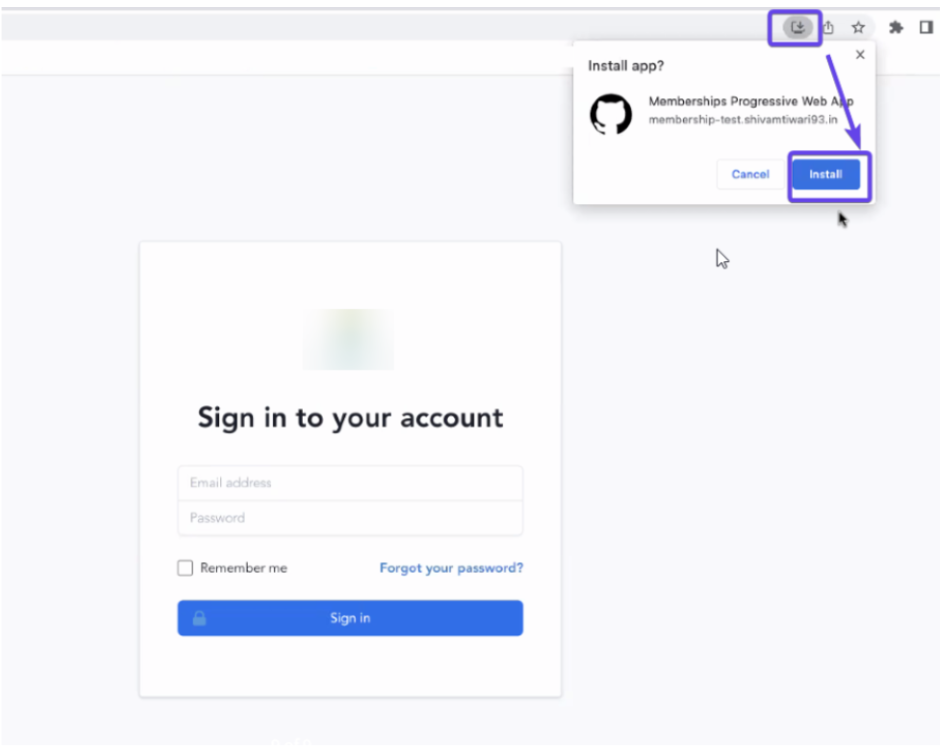
**On Android Devices:**Open the membership page in Chrome, then select Add to Home Screen from the browser menu to install the app on the device.
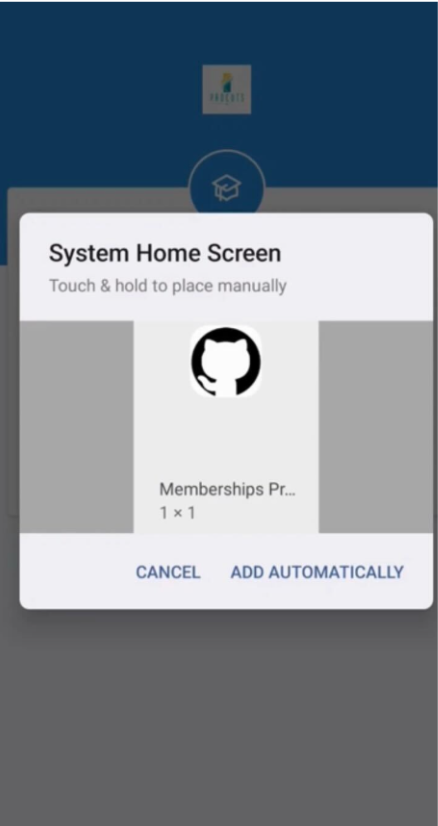
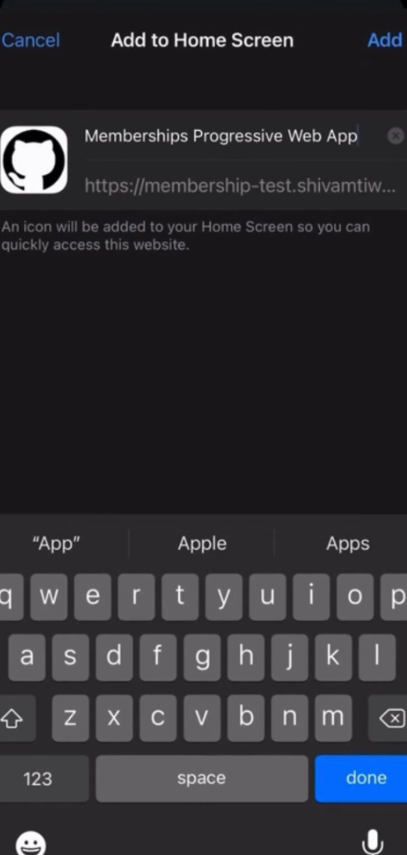
**On iOS Devices:**Using Safari (version 11.3+), users can open the membership website, tap the Share icon, and select Add to Home Screen to install the PWA.
Pro Tips
Section titled “Pro Tips”- Consistent Branding: Use the same logo, colors, and icons across your PWA and website for a cohesive user experience.
- Custom Domain Advantage: Adding a custom domain (e.g., app.yourbrand.com) enhances professionalism and user trust.
- Optimize for Speed: Compress images and minimize large files to improve load times.
- Offline Content: Cache key resources (e.g., course outlines, progress pages) to enhance offline usability.
- User Guidance: Consider adding an on-screen prompt or tutorial explaining how users can install your PWA.
Question: How do I optimize my PWA for speed and usability? Answer: Compress images, cache key content for offline access, and minimize large files to ensure fast loading times and smooth navigation for users.
Question: Does the PWA work offline? Answer: Yes, users can access previously loaded content offline. However, new data requires an ctive internet connection.
Question: Can I enable push notifications? Answer: Push notifications are fully supported on Android. iOS, however, offers limited support.
Question: Do I need technical knowledge to set this up? Answer: No coding is required. The process involves simple configuration steps available through the platform’s interface.
Question: Can I change my branding later? Answer: Yes. You can update your logo, colors, or app name at any time. Changes automatically reflect for all users upon refresh.
Question: Is coding knowledge required to set up a PWA?
Answer: No. The setup involves simple configuration steps in the platform interface no technical knowledge or coding is necessary.
Question: How can I update my app’s branding after setup?
Answer: You can update your logo, colors, or app name at any time through the platform’s Membership Settings. Once updated, these changes will automatically reflect for all users upon refresh.
Question: Will my PWA work on all devices?
Answer: Yes. One of the key benefits is cross-platform compatibility. A single PWA works effortlessly across desktops, tablets, and mobile devices (Windows, Mac, Android, and iOS) without the need to maintain separate versions.
Question: Does the PWA take up a lot of storage space on a user’s phone?
Answer: No**.** This is one of the biggest advantages of a PWA. Because it leverages the browser’s engine, it typically uses only a few megabytes of space, significantly less than a traditional native app which can often exceed 100MB.