Media Storage: Supported File Types and Specifications
This article will go over the Media Storage tab in the main Navigation menu.
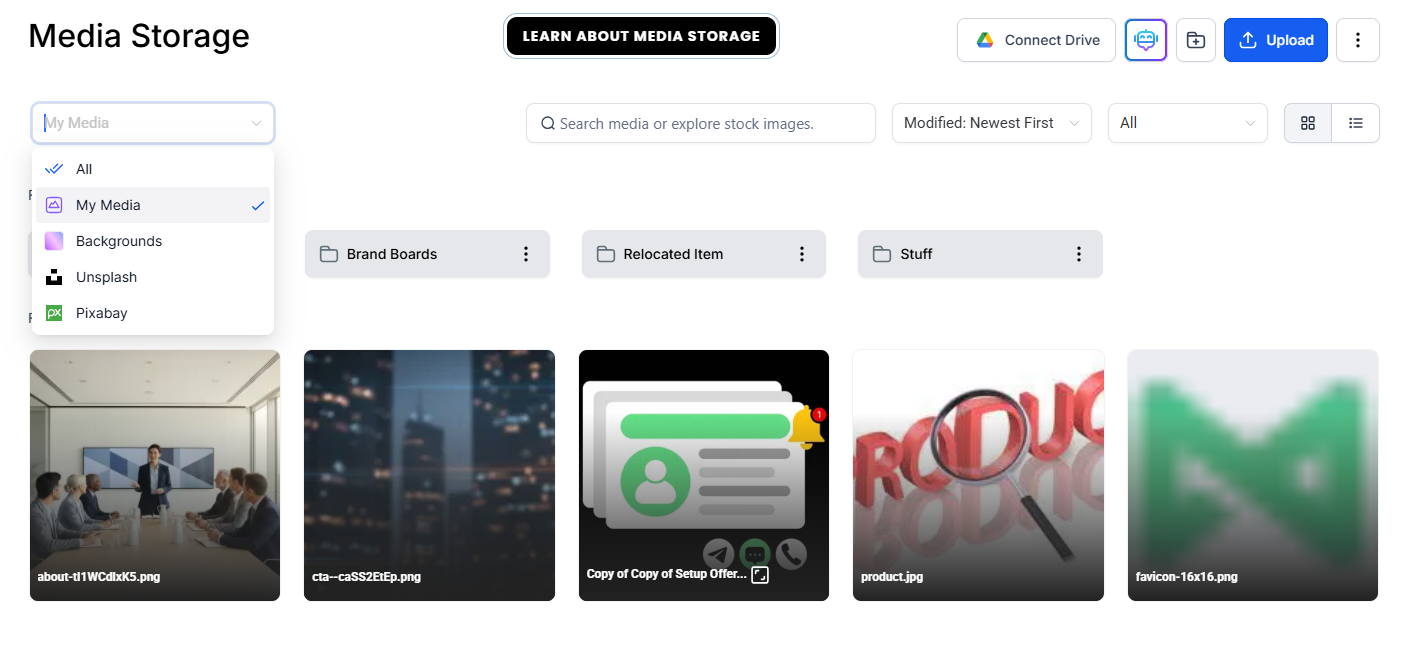
Once in the Media Storage, you can upload content, create folders for your content, and search through your existing media, pixabay, system backgrounds, or Unsplash.
File Types Supported in the Media Storage:
Here is the list of all the file types and formats that you can upload to the Media Storage.
File Type
Media Library
Social Planner
Sites & Funnels
Courses
CV File Upload
Images
PNG (.png)
100MB
10MB
100MB
50MB
50MB
JPEG (.jpg, .jpeg, .jfif, .pjpeg, .pjp)
100MB
10MB
100MB
50MB
50MB
GIF (.gif)
100MB
10MB
100MB
50MB
50MB
TIFF (.tif, .tiff, x-tiff)
100MB
10MB
100MB
50MB
50MB
WEBP (.webp)
100MB
10MB
100MB
50MB
50MB
SVG (.svg)
100MB
10MB
100MB
50MB
50MB
ICON (.ico, .cur, x-icon)
100MB
10MB
100MB
50MB
50MB
Videos
AVI (.avi, x-troff-msvideo)
4GB
1GB
4GB
5GB
50MB
QuickTime (.qt, .qtc, .mov, .moov, .moov)
4GB
1GB
4GB
5GB
50MB
MP4 (.mp4)
4GB
1GB
4GB
5GB
50MB
MPEG (.mpg)
4GB
1GB
4GB
5GB
50MB
Ogg Video (.ogv)
4GB
1GB
4GB
5GB
50MB
Windows Media (.wmv, .asf)
4GB
1GB
4GB
5GB
50MB
WebM (.webm)
4GB
1GB
4GB
5GB
50MB
Audio
AIF (.aif, .aiff, .aifc)
100MB
100MB
100MB
50MB
50MB
MIDI (.midi, .mid)
100MB
100MB
100MB
50MB
50MB
Windows Audio (.wav)
100MB
100MB
100MB
50MB
50MB
Ogg Audio (.oga)
100MB
100MB
100MB
50MB
50MB
WebM Audio (.weba)
100MB
100MB
100MB
50MB
50MB
MPEG (.mpeg)
100MB
100MB
100MB
50MB
50MB
m4a (.m4a)
100MB
100MB
100MB
50MB
50MB
Application
PDF (.pdf)
100MB
100MB
100MB
50MB
50MB
Word (.doc, .docx, ms-doc, msword, vnd.openxmlformats-officedocument.wordprocessingml.document)
100MB
100MB
100MB
50MB
50MB
Excel (excel, .xls, xlsx, .xlsm, vnd.ms-excel, x-excel, x-msexcel, vnd.openxmlformats-officedocument.spreadsheetml.sheet)
100MB
100MB
100MB
50MB
50MB
PowerPoint (.ppt, .pptx. .pptm, mspowerpoint, powerpoint, vnd.ms-powerpoint, x-mspowerpoint, vnd.ms-powerpoint, vnd.openxmlformats-officedocument.presentationml.presentation)
100MB
100MB
100MB
50MB
50MB
Apple Numbers (x-iwork-numbers-sffnumbers,
100MB
100MB
100MB
50MB
50MB
Google Sheet (vnd.google-apps.spreadsheet)
100MB
100MB
100MB
50MB
50MB
Google Doc (vnd.google-apps.document)
100MB
100MB
100MB
50MB
50MB
Google Slides (vnd.google-apps.presentation)
100MB
100MB
100MB
50MB
50MB
Text (.rtf, .txt)
100MB
100MB
100MB
50MB
50MB
ZIP (.zip, x-zip, z-zip-compressed, x-compress, x-compressed
100MB
100MB
100MB
50MB
50MB
CSV (.csv)
100MB
100MB
100MB
50MB
50MB
Font
TTF
100MB
100MB
100MB
50MB
50MB
OTF
100MB
100MB
100MB
50MB
50MB
WOFF, WOFF2
100MB
100MB
100MB
50MB
50MB
vcard
100MB
100MB
100MB
50MB
50MB
Question: What types of files can I upload to the Media Storage? Answer: You can upload a variety of file types, including images (PNG, JPEG, GIF, SVG, etc.), videos (MP4, AVI, MOV, WebM, etc.), audio files (MP3, WAV, MIDI, etc.), documents (PDF, Word, Excel, PowerPoint, etc.), fonts (TTF, OTF, WOFF), and more. Refer to the file type list for specific details on supported formats.
Question: What is the maximum file size I can upload to Media Storage? Answer: The maximum file size varies depending on the file type and the platform it is being uploaded to. For example, image files like PNG and JPEG can be up to 100MB, while videos can range from 50MB to 4GB. Please check the corresponding file types and their limits in the article above.
Question: How do I organize my media in the Media Storage? Answer: You can create folders to organize your content and easily search through your media, including files from Pixabay, Unsplash, or system backgrounds.
Question: Can I upload videos larger than 100MB? Answer: Yes, videos such as MP4, AVI, MOV, and other video file formats can be uploaded with file sizes ranging from 50MB to 4GB, depending on the platform you’re using.
Question: Can I upload Google Docs or Google Sheets to the Media Storage? Answer: Yes, you can upload Google Docs, Google Sheets, and other Google file types (Google Slides, Google Forms) to the Media Storage, with a size limit of 100MB for these documents.
Question: Can I upload files from external sources like Google Drive or Dropbox? Answer: Currently, Media Storage does not support direct uploads from external sources like Google Drive or Dropbox. However, you can download the files to your local system and then upload them manually to the Media Storage.
Question: Are all file types supported across all tools (Sites, Social Planner, Courses, etc.)? Answer: Not always. While most file types are supported across platforms, some tools have lower size limits or may not support certain file types. Refer to the file-type table for each tool’s compatibility and limits.
Question: Can I share a direct link to a file in my Media Storage with someone else?
Answer: Yes. Each file has a “Get Link” option. This generates a public URL that you can send to a client or team member so they can view or download the file without logging into the platform.
Question: What is the maximum file size for a video if I am uploading it specifically for a Course?
Answer: For the Courses section, the maximum supported size for video files (such as MP4, MOV, or AVI) is 5GB. This is higher than the 4GB limit typically allowed for Sites, Funnels, and the general Media Library.