How to Check Domain Eligibility for Transfer
This article explains how users can transfer a domain from an external registrar to their account under . The purpose of domain transfer is to centralize management, allowing users to handle DNS, billing, and security all in one platform. Centralized domain management enhances convenience, improves operational efficiency, and contributes to better customer engagement.
Key Features and Benefits
Section titled “Key Features and Benefits”- Centralized Domain Management: Manage all domains, DNS records, billing, and security from one account.
- Improved Workflow Efficiency: Reduces the need to log in to multiple registrars.
- Extended Domain Expiry: Transferring a domain often adds one year to the current expiration.
- Enhanced Security and Control: Full control over domain settings, including DNS and SSL configuration.
- Streamlined Customer Experience: Simplifies onboarding for users managing multiple domains.
Domain Transfer Process Overview
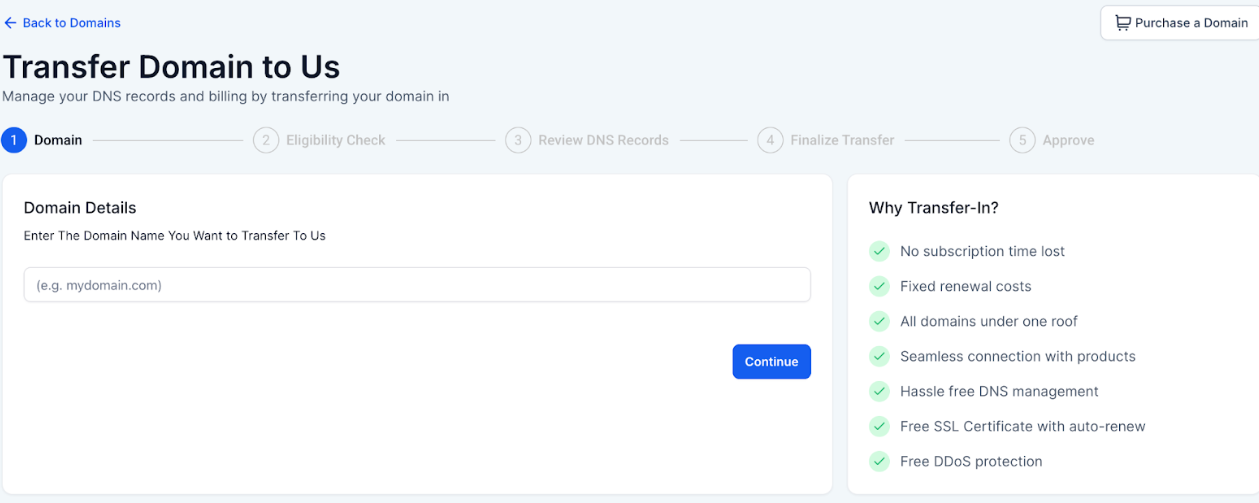
Section titled “Domain Transfer Process Overview”- Enter Domain - Input the domain you want to transfer.
- Eligibility Check - Confirm the domain qualifies for transfer.
- Review DNS Records - Upload or scan DNS settings for continuity.
- Finalize Transfer - Validate and authorize the transfer.
- Approve - Accept the transfer at the current registrar to complete the process.
Eligibility Check
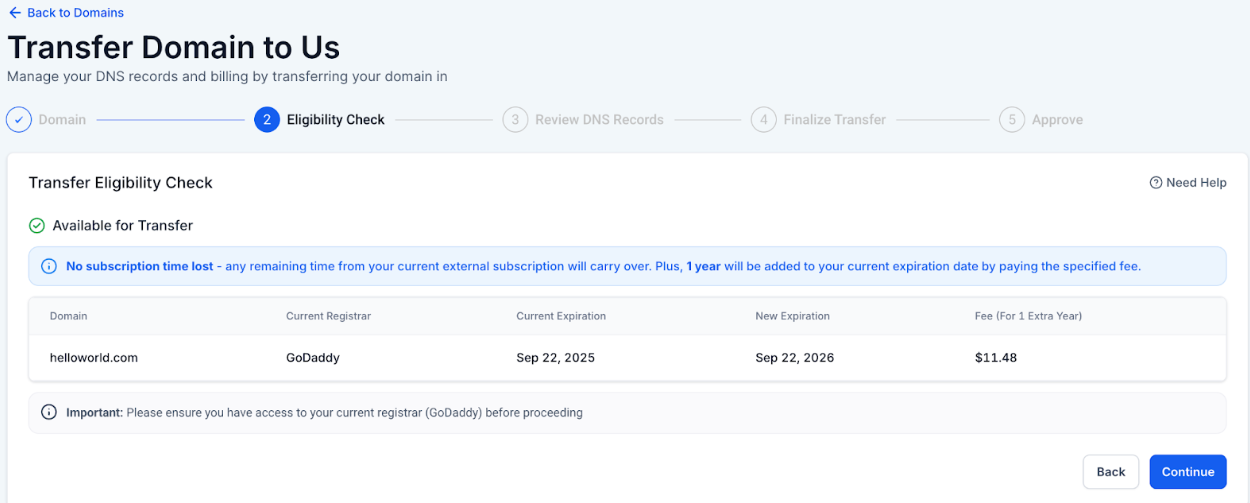
Section titled “Eligibility Check”The Eligibility Check ensures that a domain meets all technical and administrative requirements for transfer.
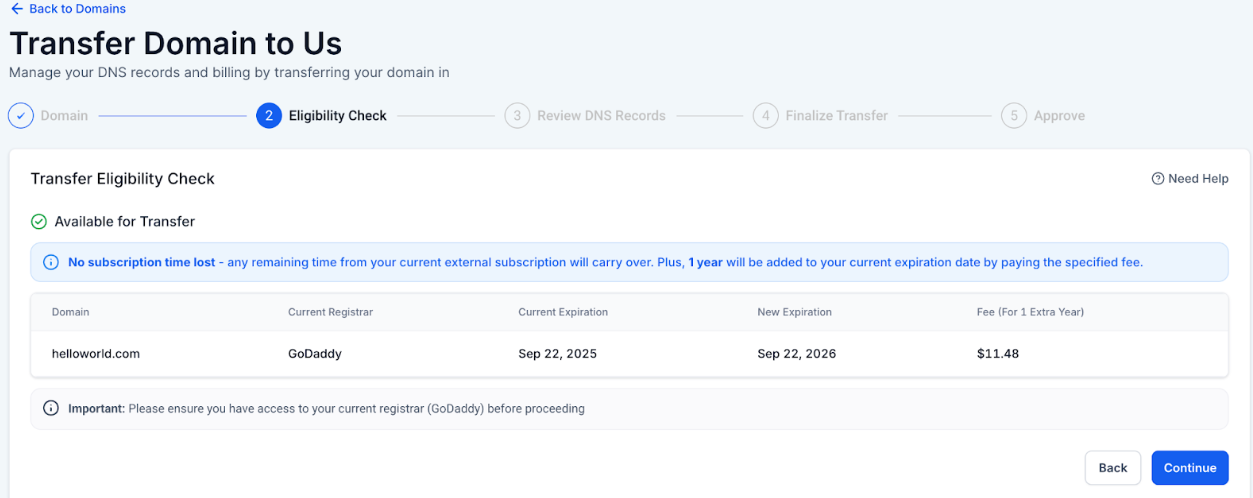
Information Provided When Eligible:
- Domain name
- Current registrar
- Current expiration date and new expiration date (typically extended by 1 year)
- Applicable fee for expiry extension
Conditions That Make a Domain Ineligible:
- Registrar not supported by the platform
- Domain previously purchased internally
- Unsupported top-level domain (TLD)
- Domain purchased or transferred in the last 60 days
- EPP status restrictions (e.g., pendingDelete, redemptionPeriod, serverHold)
- Transfer would exceed the maximum allowed domain term
- Other platform-specific restrictions
When a domain is ineligible, the system disables the Continue button and displays an error message explaining the reason.
How to Use: Step-by-Step
Section titled “How to Use: Step-by-Step”1- Log in to your account under .
2- Navigate to the Domain Transfer section.
3- Enter the domain you want to transfer.
4- Run the eligibility check.
5- If eligible, review or upload DNS records.
6- Validate and authorize the transfer.
7- Approve the transfer at the current registrar.
8- Monitor status until the transfer is completed.
Pro Tips
Section titled “Pro Tips”- Check Registrar Requirements: Verify that your current registrar supports domain transfers and that there are no restrictions.
- Update Contact Information: Ensure domain ownership and contact information are accurate before initiating a transfer.
- Backup DNS Records: Save existing DNS settings to avoid service disruption.
- Monitor Domain Status: Keep an eye on both the source and destination accounts until the transfer completes.
- Timing: Avoid initiating transfers during critical campaigns or peak website traffic periods to prevent temporary downtime.
Question: How long does a domain transfer take? Answer: Transfers typically complete within 5–7 days, depending on the current registrar and verification steps.
Question: Can I transfer a domain if it was purchased recently? Answer: No. Domains purchased or transferred in the last 60 days are ineligible due to registrar restrictions.
Question: Will transferring my domain affect my website or email? Answer: No, as long as DNS records are reviewed and maintained correctly during the transfer.
Question: Does transferring a domain extend its expiration date? Answer: Yes. Most transfers add one additional year to the current domain expiration.
Question: What happens if my domain is ineligible for transfer? Answer: The system will disable the transfer option and display the reason. You may need to wait, update the domain status, or use an alternative domain.
Question: Will my name servers change automatically after the transfer is complete?
Answer: During the transfer, we attempt to keep your existing name servers to avoid downtime. However, once the domain is fully moved into your account, you can switch to our native name servers to manage all your DNS records directly from our dashboard.
Question: What are EPP status restrictions, and why would they stop my transfer?
Answer: EPP status restrictions are specific locks placed on a domain by your current registrar. Statuses like pendingDelete, redemptionPeriod, or serverHold indicate the domain is not in a “healthy” or “active” state, making it ineligible for transfer until those issues are resolved with the original provider.