Conversations AI Bots: Respond to Images
Conversations AI Bots: Respond to Images
Visual communication is a core part of how people express themselves. Whether it’s sharing a product photo, a screenshot, or a menu, images often say more than words. That’s why has introduced a powerful upgrade to its Conversations AI, the ability to understand and respond to images.
This capability allows AI bots to intelligently process and react to image content sent across multiple messaging platforms, making customer interactions more visual, intuitive, and context-aware.
Key Features & Benefits
Section titled “Key Features & Benefits”Image Recognition & Contextual Replies
Section titled “Image Recognition & Contextual Replies”Bots can analyze and interpret images to generate meaningful, relevant responses, providing smarter automation in scenarios that go beyond text.
Multi-Image Support
Section titled “Multi-Image Support”Whether a user sends a single photo or multiple images in one message, the bot processes them collectively and responds accordingly.
Broad Image Format Compatibility
Section titled “Broad Image Format Compatibility”Supports common image types:
- JPG
- JPEG
- PNG
- HEIC
✅ Cross-Channel Compatibility
Section titled “✅ Cross-Channel Compatibility”Seamlessly works across major communication channels, including:
- Live Chat
- Facebook Messenger
- SMS (MMS)
How to Use It
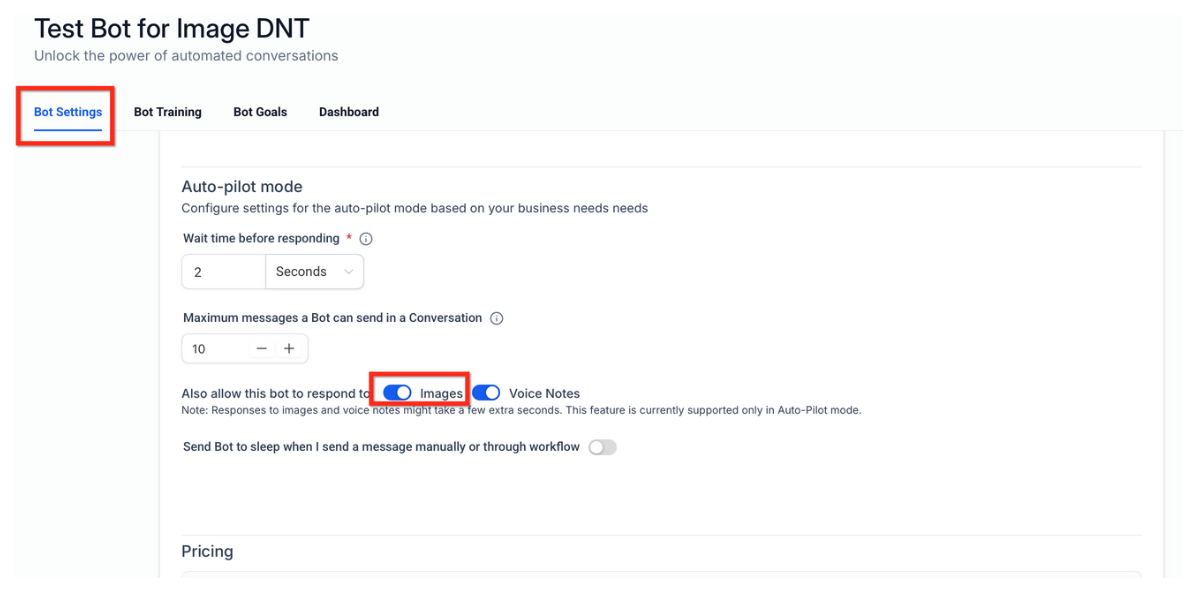
Section titled “How to Use It”Step 1: Update Bot Settings
Section titled “Step 1: Update Bot Settings”- Open your Conversations AI Bot Settings page.
- Turn on the option: “Also allow this bot to respond to: Images.”
Once enabled, the bot automatically begins responding to images as part of conversations across all supported channels.
Step 2: Test the Feature
Section titled “Step 2: Test the Feature”- Send an image(e.g., via WhatsApp or Facebook Messenger) to a conversation handled by your AI bot.
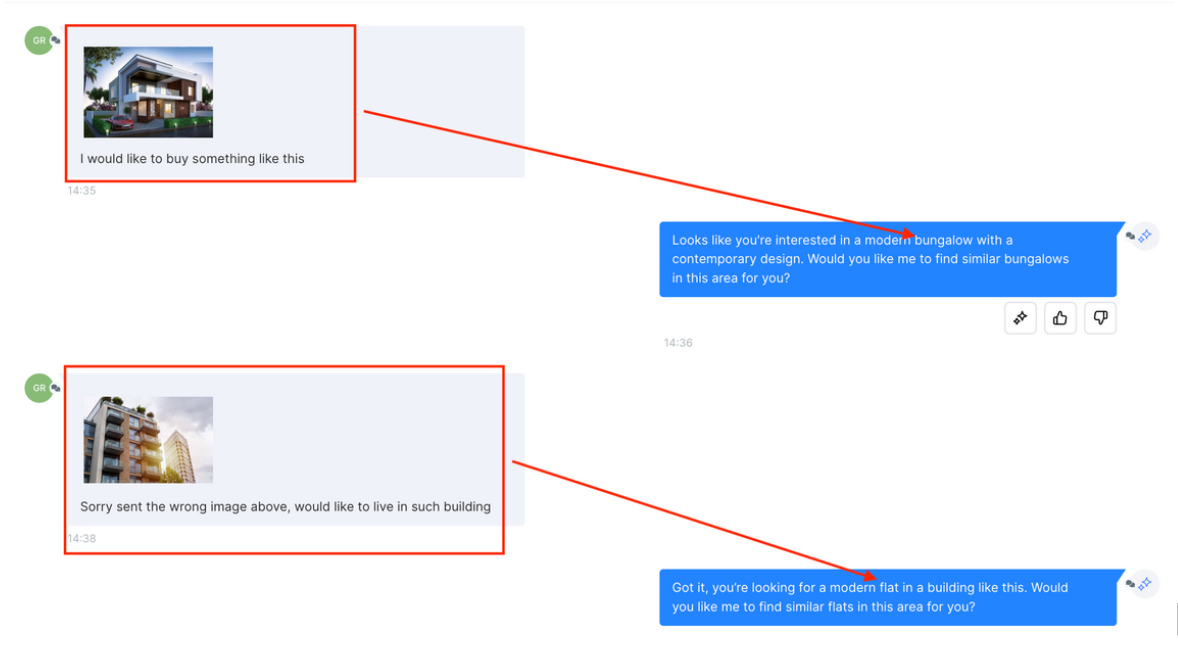
Question: What happens if someone sends multiple images at once? Answer: All images are analyzed together, and the bot responds based on the combined context of the media shared.
Question: Does the bot require separate training for image inputs? Answer: No. It uses the same prompt and knowledge base configured for your bot. The system translates visual data into insights the bot already understands.
Question: Are there limitations on image size or resolution? Answer: Yes. While most standard image sizes work well, extremely large or corrupted files may not be processed correctly. It’s best to use standard mobile-friendly image formats.
Question: Does the bot work with screenshots? Answer: Yes. Whether it’s a screenshot of an error message, form, or invoice, the bot can interpret and respond accordingly.
Question: Which channels support image-based responses? **Answer: The bot works across Live Chat, WhatsApp, Facebook Messenger, Instagram, and SMS (MMS).
Question: How do I enable image support for my AI bot? Answer: You can enable this feature by navigating to your Conversations AI Bot Settings page and toggling on the option: “Also allow this bot to respond to: Images.” Once turned on, the bot will automatically process images across all supported channels.
Question: Can the bot read text inside an image, like a receipt or a handwritten note?
Answer: Yes! The bot uses OCR (Optical Character Recognition) as part of its analysis. This means it can “read” text within images, such as order numbers on receipts, text in screenshots, or menu items, and then use its knowledge base to provide a relevant answer.
Question: Is this feature limited to just web-based Live Chat?
Answer: No. This is a cross-channel upgrade. Once enabled, the bot can intelligently react to images sent via WhatsApp, Facebook Messenger, Instagram, and even SMS (MMS).