Conversations AI Bots: Respond to Audio
This article introduces a transformative feature in the Conversations AI toolkit: voice message processing and intelligent response capabilities. Businesses can elevate their customer interactions by allowing AI bots to understand and reply to voice notes across multiple messaging platforms. The result? More natural, human-like, and accessible communication, all powered by automation.
Key Features & Benefits
Section titled “Key Features & Benefits”- Voice Message Transcription & UnderstandingConversations AI accurately transcribes incoming audio messages, understands the content, and replies with contextual intelligence just like it would with text.
- Multi-Format Audio SupportSupports a wide range of common audio formats, including OGG, MP3, MP4 audio, AAC, M4A, and MPEG.
- Platform-Wide CompatibilityWorks across major communication channels such as WhatsApp, Facebook Messenger, Instagram, and SMS (MMS).
- Batch Audio ProcessingHandles multiple audio files sent in one message, responding based on the combined input.
- Real-Time ProcessingBuilt with a lightweight architecture that enables fast audio-to-text conversion and response without interrupting the conversation flow.
How to Use It
Section titled “How to Use It”Step 1: Configure the AI Bot
Section titled “Step 1: Configure the AI Bot”- Open the Conversations AI Bot Settings.
- Toggle “Also allow this bot to respond to Audio.”
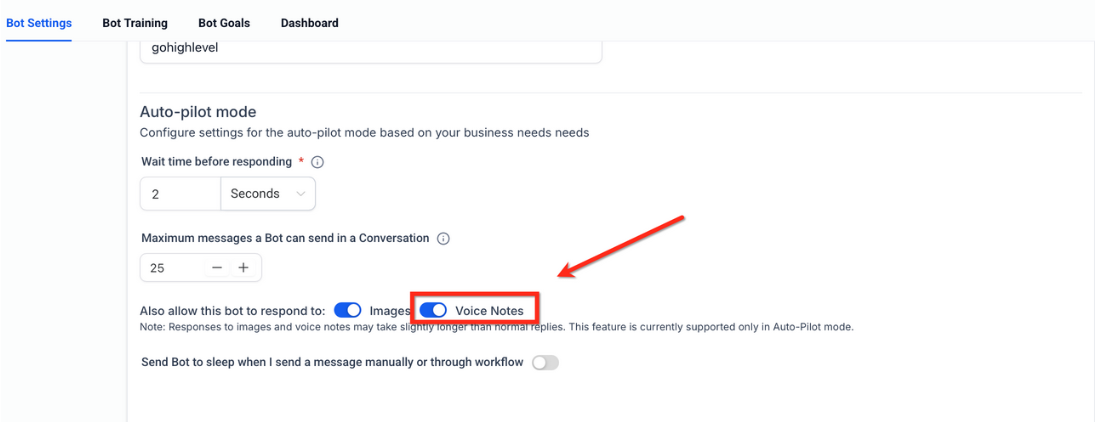
Once enabled, your bot will automatically start processing and responding to supported audio messages.
Step 2: Test the Feature
Section titled “Step 2: Test the Feature”Send a voice message (e.g., via WhatsApp or Facebook Messenger) to a conversation handled by your AI bot.
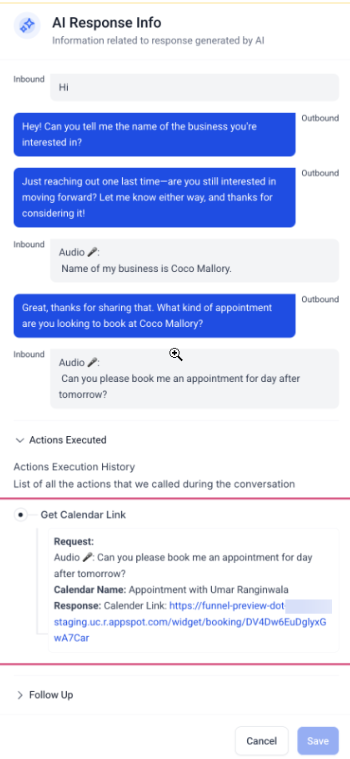
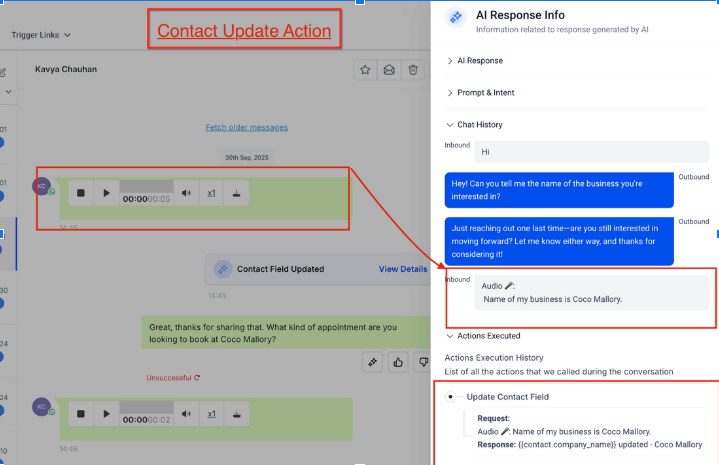
The AI will transcribe the voice input, understand it, and respond just as it would with written text.
Supported Audio Types
Section titled “Supported Audio Types”Voice Notes from Platforms
Section titled “Voice Notes from Platforms”- Facebook Messenger
- Instagram DMs
General Audio Formats
Section titled “General Audio Formats”- OGG
- MP3
- MP4 Audio
- AAC
- M4A
- MPEG
Question: Can the AI respond to audio files sent as attachments, not just voice notes? Answer: Yes. As long as the audio file format is supported (e.g., MP3, M4A), it will be transcribed and responded to appropriately.
Question: What happens if a user sends multiple audio clips in one message? Answer: All audio clips are processed together. The AI will consider the full context before generating a single response.
Question: Do I need to train my bot separately for audio messages? Answer: No. The bot uses your existing prompt, knowledge base, and settings. Audio inputs are transcribed into text before being processed.
Question: Does the AI respond in real time? Answer: Yes. The system is optimized for fast audio-to-text conversion and response, allowing seamless, real-time interactions.
Question: How do I enable the voice message response feature for my AI bot?
Answer: You can activate this feature by navigating to the Conversations AI Bot Settings and toggling the option labeled “Also allow this bot to respond to Audio.”
Question: What specific audio file formats does the AI bot support?
Answer: The bot can process a wide range of common formats, specifically: OGG, MP3, MP4 audio, AAC, M4A, and MPEG.