Conversation AI: Flow-Based Builder
Conversation AI: Flow-Based Builder
In today’s world, businesses are always looking for new ways to improve their operations and connect better with customers. One great way to do this is by using smart, automated systems. Conversation AI is a powerful tool that helps businesses automate tasks like lead generation, qualification, scheduling, and more. This article will take a closer look at the Flow-Based Builder, a simple visual tool that makes creating intelligent chatbots easy.
Key Features and Benefits
Section titled “Key Features and Benefits”The Flow-Based Builder transforms the way businesses create and manage conversational bots. This intuitive platform empowers teams to design bots that engage customers in dynamic and personalized ways. Let’s break down the standout features and the benefits they offer:
Visual Flow Builder
Section titled “Visual Flow Builder”The heart of the Flow-Based Builder is its visual interface, allowing users to design complex workflows with ease. Through a simple drag-and-drop canvas, you can create and map out entire customer journeys, including interactions like lead qualification, multi-step processes, and more. This visual builder is a game-changer, simplifying what was once a complex task into something accessible for all users, regardless of technical expertise.
Advanced Lead Qualification
Section titled “Advanced Lead Qualification”Lead generation and qualification become more effective with the power of AI. The platform allows businesses to design multi-step journeys where leads are intelligently guided toward the right outcomes. With no friction involved, the AI captures information from leads, ensuring they are directed toward the most appropriate actions without manual intervention.
Complex Logic and Branching
Section titled “Complex Logic and Branching”One of the most powerful aspects of the Flow-Based Builder is its ability to incorporate complex logic and branching paths. With the click of a button, users can add conditions, triggers, and actions to adapt the bot’s behavior based on the lead’s responses. This flexibility ensures that every conversation is personalized and efficient, allowing for a more engaging user experience.
Multi-Calendar Booking
Section titled “Multi-Calendar Booking”Efficient scheduling is a critical part of customer interactions. The platform automates appointment scheduling by integrating multiple calendars. Whether it’s for consultations, follow-ups, or meetings, the AI automatically selects the right calendar based on the scenario, ensuring a seamless booking experience for both the business and the customer.
Dynamic Integrations
Section titled “Dynamic Integrations”The Flow-Based Builder offers robust integrations with other systems and tools, enhancing its functionality even further. Whether it’s sending or retrieving data via webhooks, triggering automated workflows for special cases, or keeping the team informed through notifications, the platform ensures seamless integration with your existing systems. Additionally, bot transfers allow for smooth handoffs between bots or teams, while automated summaries and instant invoices ensure that every conversation is documented and actioned promptly.
How to Use the Flow-Based Builder
Section titled “How to Use the Flow-Based Builder”Using the Flow-Based Builder is simple and efficient. Here’s how you can get started:
1- Access the Builder: Navigate to AI Agents > Conversation AI section and select the Agents List. Click on ‘Create Bot’ and select the Flow Builder.
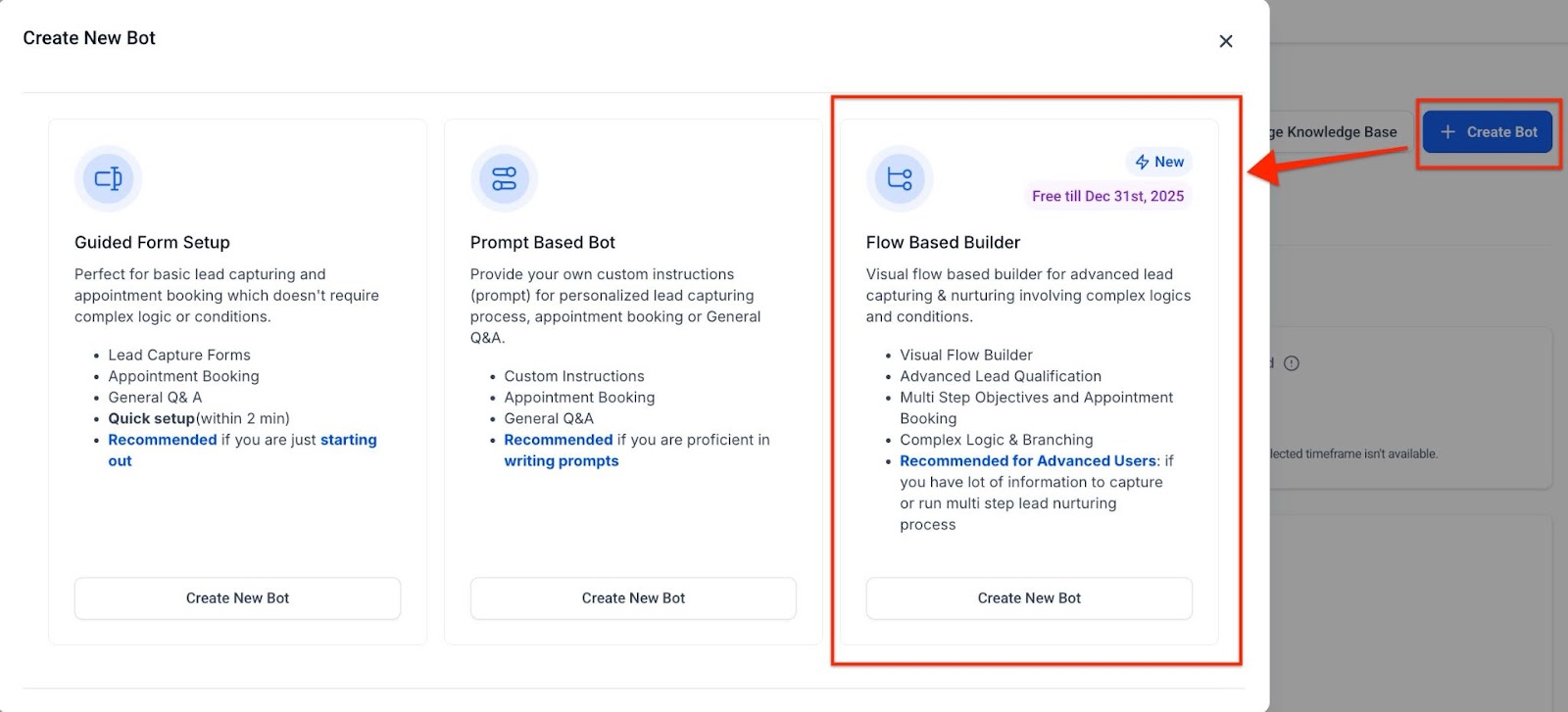
2- Set Your Bot’s Goals: Choose the desired goals for your bot, such as qualifying leads, automating bookings, or providing customer support.
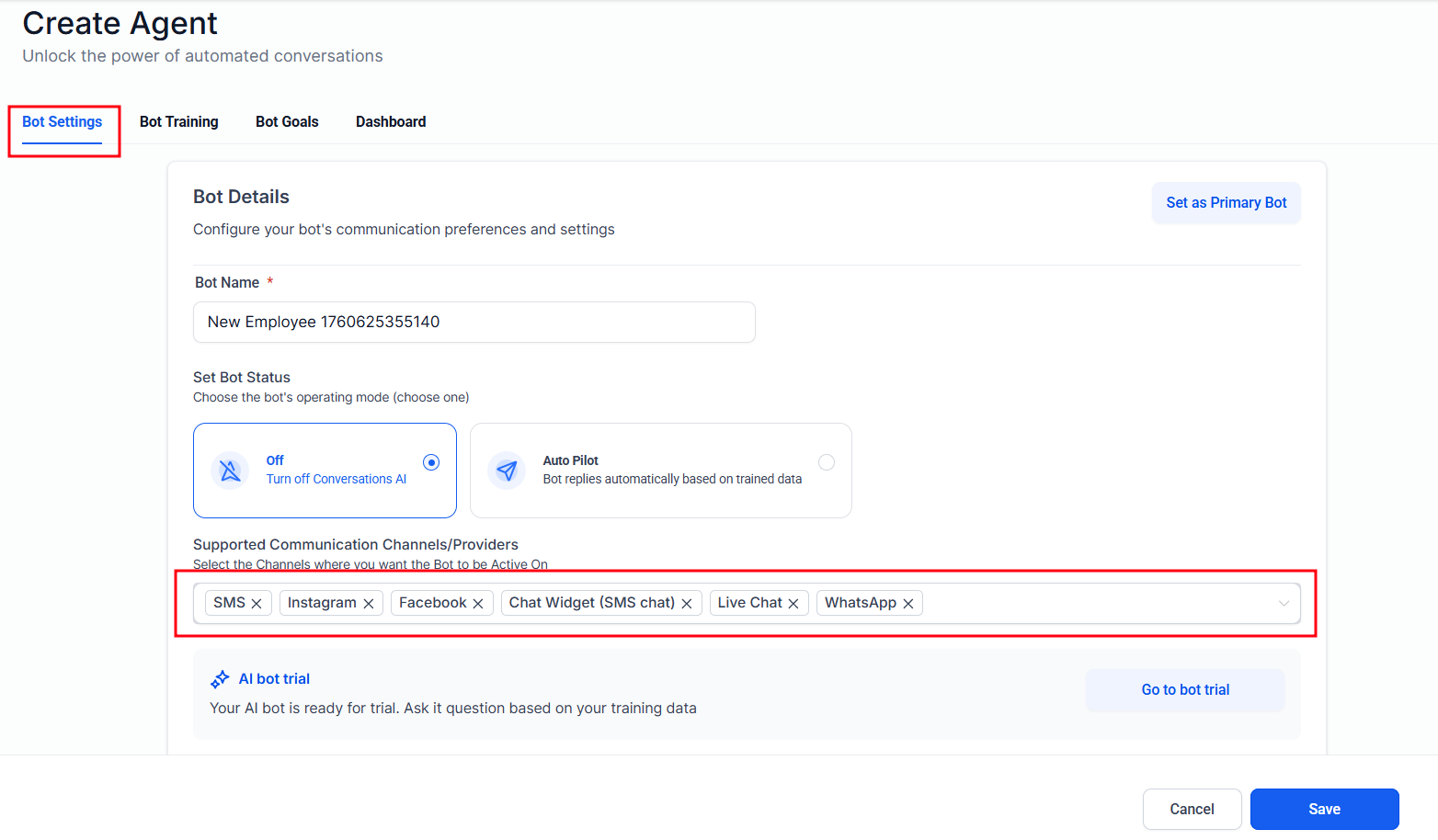
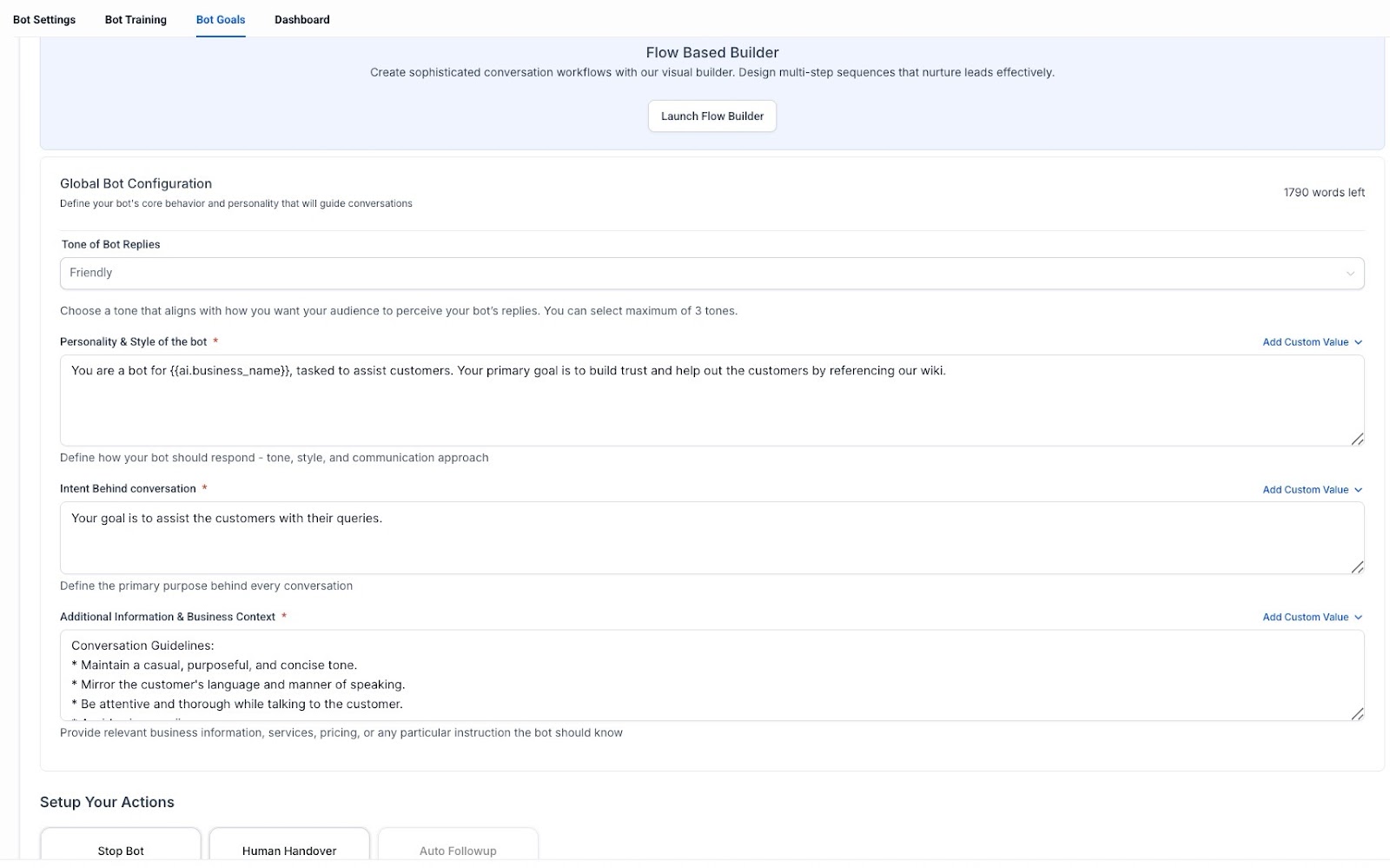
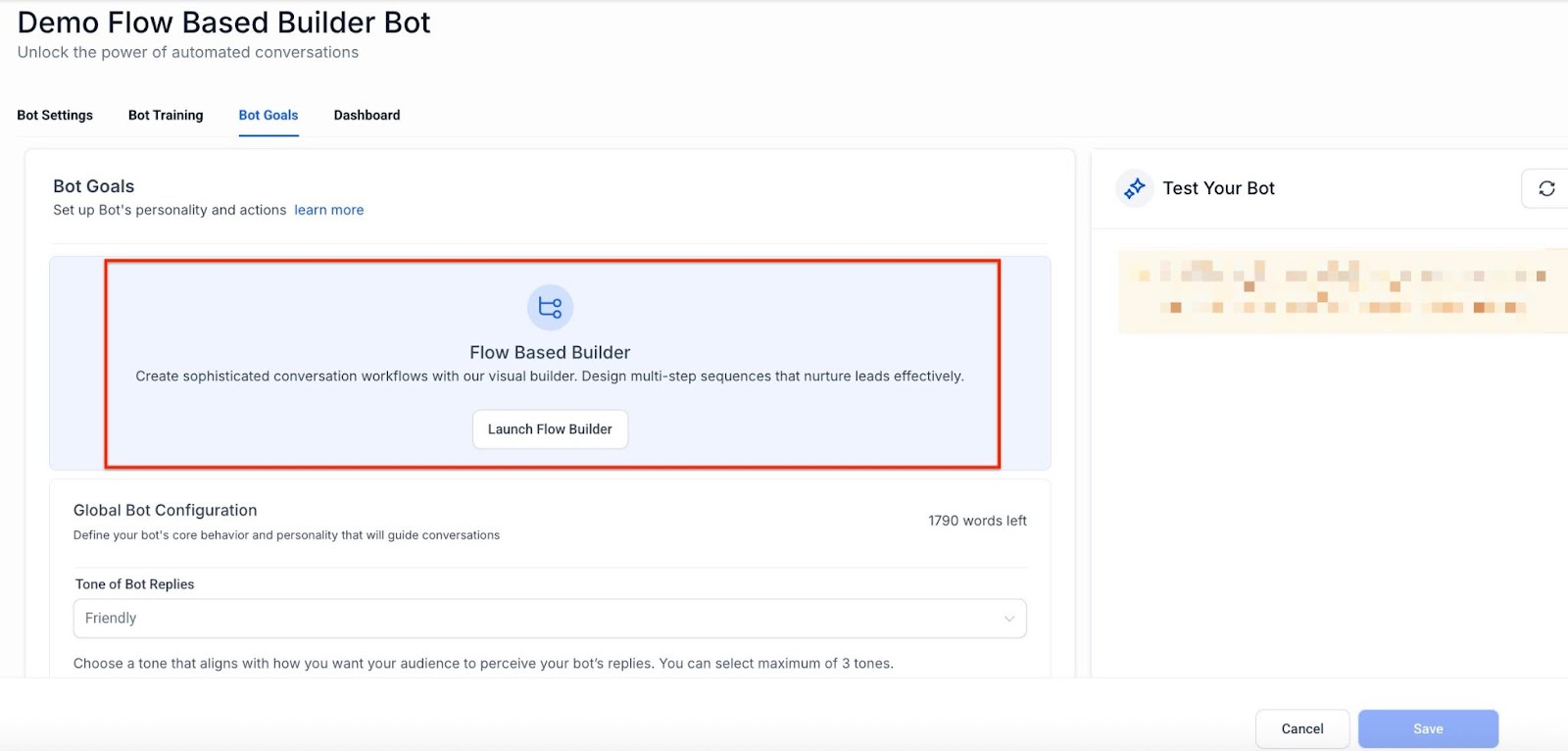
3- Design the Flow: Use AI Actions such as AI Capture, AI Messages, and Custom Triggers to build out your bot’s conversation paths. Add conditions and logic to ensure the bot responds in a personalized and relevant way.
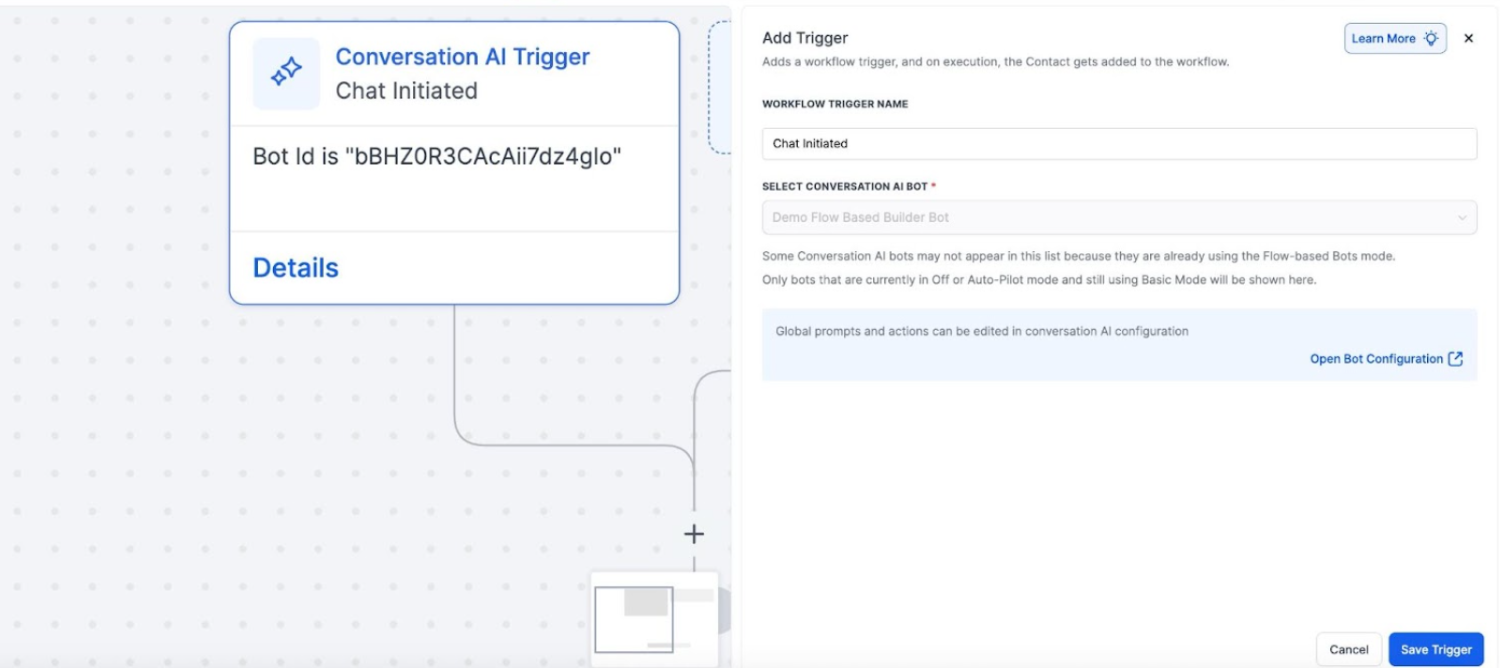
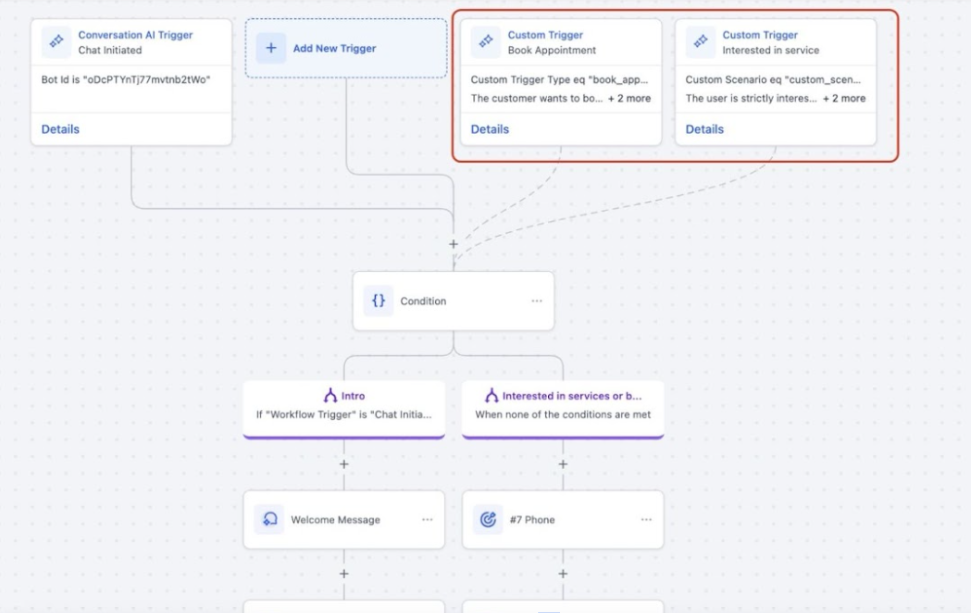
4- Integrate Calendars and Workflows: Automate the scheduling process and ensure follow-ups are handled efficiently by integrating multiple calendars and workflow tools.
5- Deploy: After testing your bot and making any necessary adjustments, deploy it to start interacting with users.
Pro Tips
- Test Early and Often: Before deploying your bot, always test the flow in different scenarios to ensure it performs as expected. Small tweaks can make a big difference in user experience.
- Leverage Multi-Calendar Integration: Maximize your scheduling efficiency by ensuring all your calendars are properly linked. This minimizes booking conflicts and streamlines appointment management.
- Use Automated Summaries: Enable automatic chat summaries to maintain a record of every interaction. This is useful for review and for generating follow-up actions.
- Take Advantage of Webhooks: Integrating webhooks can help send or retrieve data in real-time, making your bot more responsive and dynamic.
- Stay Ahead with Logic and Branching: The more you experiment with conditional logic, the more personalized and engaging your bot will become. Always explore branching paths to create truly dynamic conversations.
Question: What is the Flow-Based Builder? Answer: The Flow-Based Builder is a visual tool that allows you to design and manage intelligent chatbots, automate workflows, and personalize customer interactions—all without needing coding skills.
Question: How do I create a chatbot? Answer: To create a bot, navigate to Conversation AI, select the Agents List, and click ‘Create Bot.’ Then, choose Flow Builder and start designing your chatbot’s conversation flow.
Question: Can I integrate multiple calendars? Answer: Yes, the Flow-Based Builder allows you to integrate multiple calendars, enabling the AI to automatically schedule appointments across the right calendars based on the situation.
Question: Is coding required to use the Flow-Based Builder? Answer: No, the platform is designed to be user-friendly with drag-and-drop functionality, so no coding is required to build advanced conversational bots.
Question: How can I track and manage conversations? Answer: You can use features like automated chat summaries, notifications, and transcripts to keep track of interactions and ensure your team is always informed.
Question: Can I edit associations after a form has been published? Answer: Yes, you can edit associations even after a form has been published. The in-builder editing feature allows you to update object associations and field settings directly within the form builder, providing flexibility without needing to start from scratch.
Question: What happens if a contact interacts outside a scheduled scenario? Answer: The bot can be configured to handle exceptions, reroute interactions, or trigger specific workflows to ensure every conversation is managed appropriately.
Question: Does the bot support multiple languages in the same flow?
Answer: The AI engine is designed to recognize and respond in the language used by the customer. However, for the best experience, you can build branching paths based on a “Language Preference” question to ensure the rest of the flow follows the correct cultural and linguistic nuances.