Newsletters for Communities
Newsletters for Communities
In today’s digital landscape, maintaining engagement within online communities is essential. Newsletters have become a powerful tool to keep members informed, connected, and active. This article explores the key features, benefits, and practical steps to leverage newsletters effectively within community groups. Whether you manage a small interest group or a large membership platform, this guide will help you understand how newsletters can transform your community interaction.
Key Features and Benefits
Section titled “Key Features and Benefits”- Personalized Content Delivery: Newsletters spotlight the most relevant and trending posts, active discussions, and upcoming events tailored to the interests of community members.
- Automatic Generation and Distribution: The newsletter is created and sent automatically based on a chosen frequency, reducing manual workload for administrators.
- Member Subscription Management: Every member can easily update their preferences or unsubscribe without affecting other communications.
- Interactive Elements: Clickable cards within newsletters allow direct engagement with posts, threads, or events, streamlining user interaction.
- Frequency Options: Flexible scheduling includes daily, weekly, bi-weekly, or monthly delivery to best fit the community’s activity rhythm.
Benefits
Section titled “Benefits”- Boosts Member Engagement: Regular newsletters keep members returning by highlighting fresh content and conversations.
- Improves Retention: By surfacing trending topics and upcoming events, newsletters encourage ongoing participation.
- Facilitates Community Growth: Increased activity creates a positive feedback loop, attracting new members through vibrant interaction.
- Saves Time for Administrators: Automated processes mean less manual effort in content curation and communication.
- User Experience: Members receive curated content that feels personalized and relevant, improving satisfaction and loyalty.
How to Use
Section titled “How to Use ”- Go to your Community Dashboard.
- Navigate to →Settings.
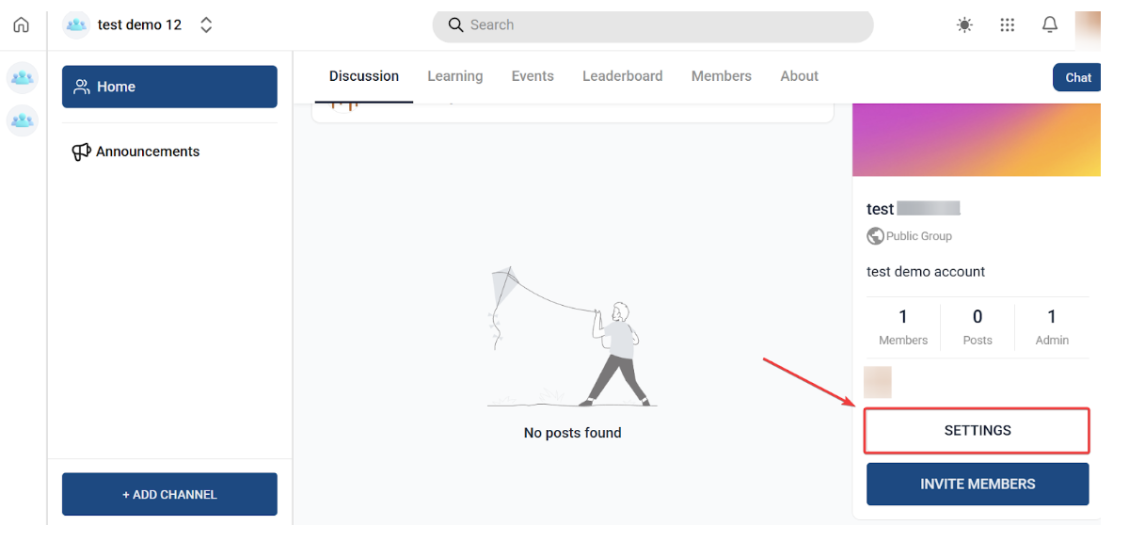
-
Select →Newsletter from the menu options.
-
Toggle the Newsletter ON (if it’s off by default).
-
Choose the desired frequency for sending newsletters:
- Daily
- Weekly
- Bi-weekly
- Monthly
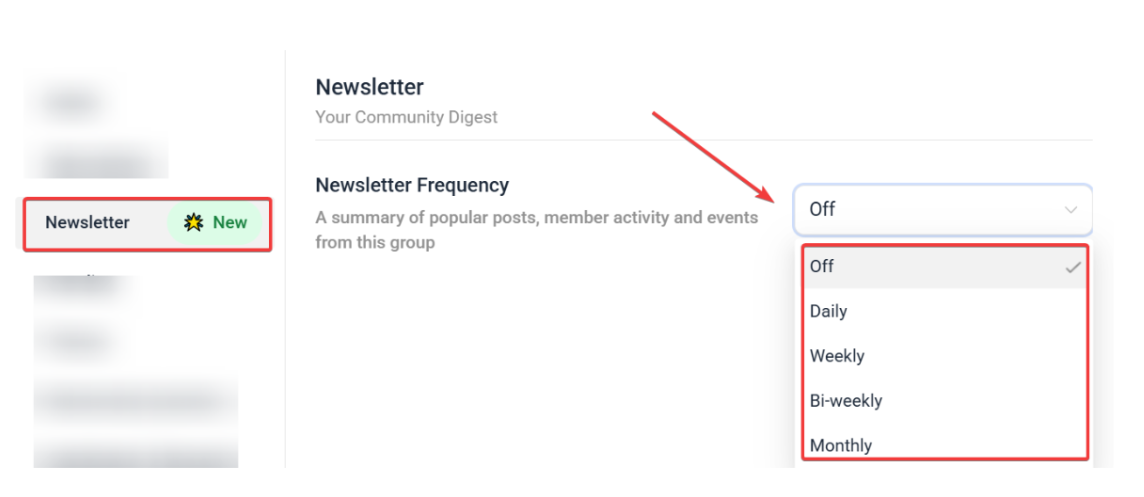
- Save your settings. Newsletters will now be generated and sent automatically to members via email.
Question: Can members choose which newsletters they receive? Answer: Yes, members can manage their preferences, opting in or out of newsletters without affecting their other community notifications.
Question: How often should newsletters be sent? Answer: The ideal frequency depends on community activity. Weekly or bi-weekly newsletters work well for most groups, but daily or monthly options are also available to fit your needs.
Question: Are newsletters customizable? Answer: Many community platforms allow basic customization such as choosing featured content or adjusting layout, helping you tailor the newsletter to your audience.
Question: What if a member wants to unsubscribe? Answer: Members can easily unsubscribe via a link included in every newsletter, ensuring compliance with best communication practices.
Question: Do newsletters require extra work from community managers? Answer: Once enabled, newsletters are mostly automated, significantly reducing manual effort. However, occasional monitoring and tweaking based on analytics are recommended.
Question: Do members need to sign up separately to receive newsletters? Answer: No, all verified community members are automatically included in the newsletter list unless they manually unsubscribe or change their email preferences.
Question: Are newsletters compatible with interactive content? Answer: Yes. Many newsletters include clickable cards or links that allow members to directly engage with posts, threads, or events from within the email itself.
Question: Does the newsletter include a summary of what’s happening in the community?
Answer: Yes. The newsletter is designed to spotlight the most relevant and trending posts, active discussions, and upcoming events, ensuring members stay informed about the community’s latest activity.
Question: Will the newsletter look different for every member?
Answer: Yes. One of the key benefits is Personalized Content Delivery, which means the newsletter is designed to surface the most relevant trending posts and active discussions tailored to the specific interests of each community member.
Question: Where do I find the toggle to enable the community newsletter?
Answer: You can enable this feature by going to your Community Dashboard, navigating to Settings, and selecting the Newsletter menu option.